

AI Integration Quick Reference
AI Integration Quick Reference
- Requires: UNNotificationServiceExtension target in your app
- Remove specific:
UNUserNotificationCenter.current().removeDeliveredNotifications(withIdentifiers:) - Remove all:
UNUserNotificationCenter.current().removeAllDeliveredNotifications() - Use case: Clear notifications when user reads message in-app
- Related: Push Notifications · Increment Badge Count
UNNotificationServiceExtension
This service grabs the data from the push notification payload, the user can modify its content and display the customized data on to the push notification.Step 1: Add UNNotificationServiceExtension inside the app.
- Click on
File—>New—>Targets—>Application Extension—>Notification Service Extension.
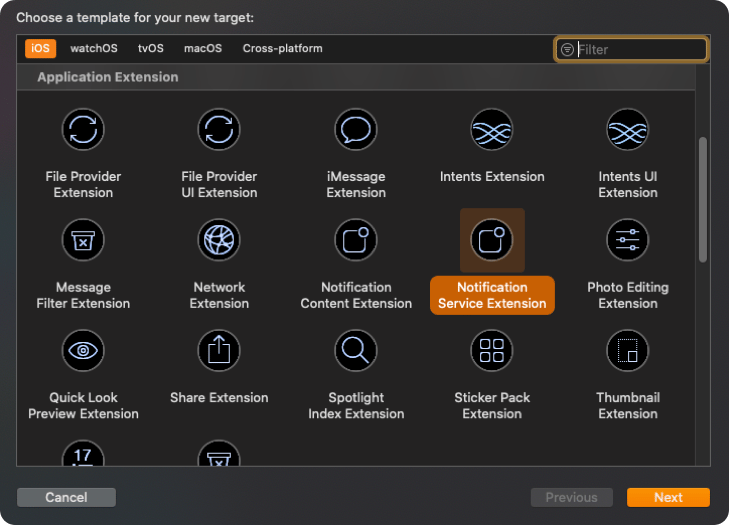
- Add
Product Nameand click onFinish.
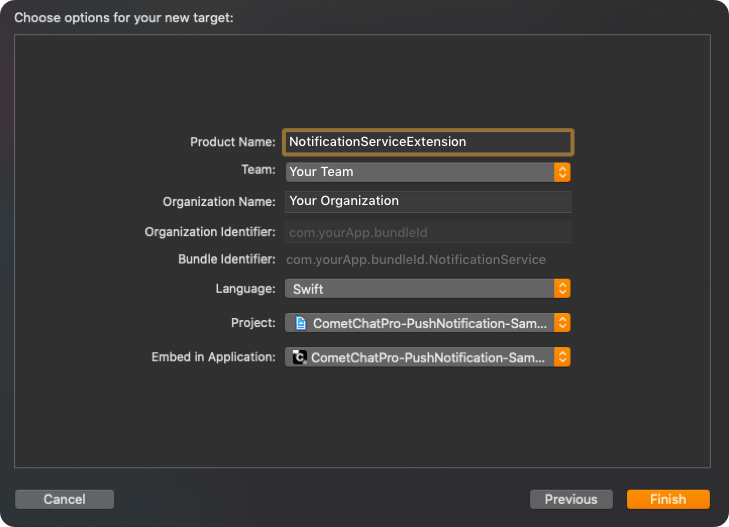
Step 2: Add CometChat SDK in your Notification Extension.
Make sure you are adding the CometChat SDK in your Notification Extension. If you are using pods then your pod file should contain the following:- Swift
Step 3: Add Code for removing Notifications.
Once you have configured the Notification Service, add the below code indidReceive(_:withContentHandler:) method under bestAttemptContent condition. The below code shows how you can remove the notifications for call type messages since we need to show the latest call notification.
- Swift
sessionID.
You can change the implementation as per your service. Once you added the code, add the completion handler in the main thread:
- Swift
Next Steps
Push Notifications
Set up push notifications for your iOS app
Increment Badge Count
Update app icon badge from push notifications
Mark Delivered from Push
Mark messages as delivered via push notification
Background Updates
Keep real-time connection alive in background