

1:1 conversations only. AI Agents currently respond only in one-on-one conversations between an end user and the agent user. They do not respond to messages sent in groups, even if the agent user is added as a member or owner. Group support is on the roadmap — share your use case on feedback.cometchat.com.
Prerequisites
Before implementing AI agents, ensure you have:- Completed Getting Started setup
- CometChat UIKit v5+ installed
- AI features enabled in your CometChat Dashboard
- User logged in with
CometChatUIKit.login()
Overview
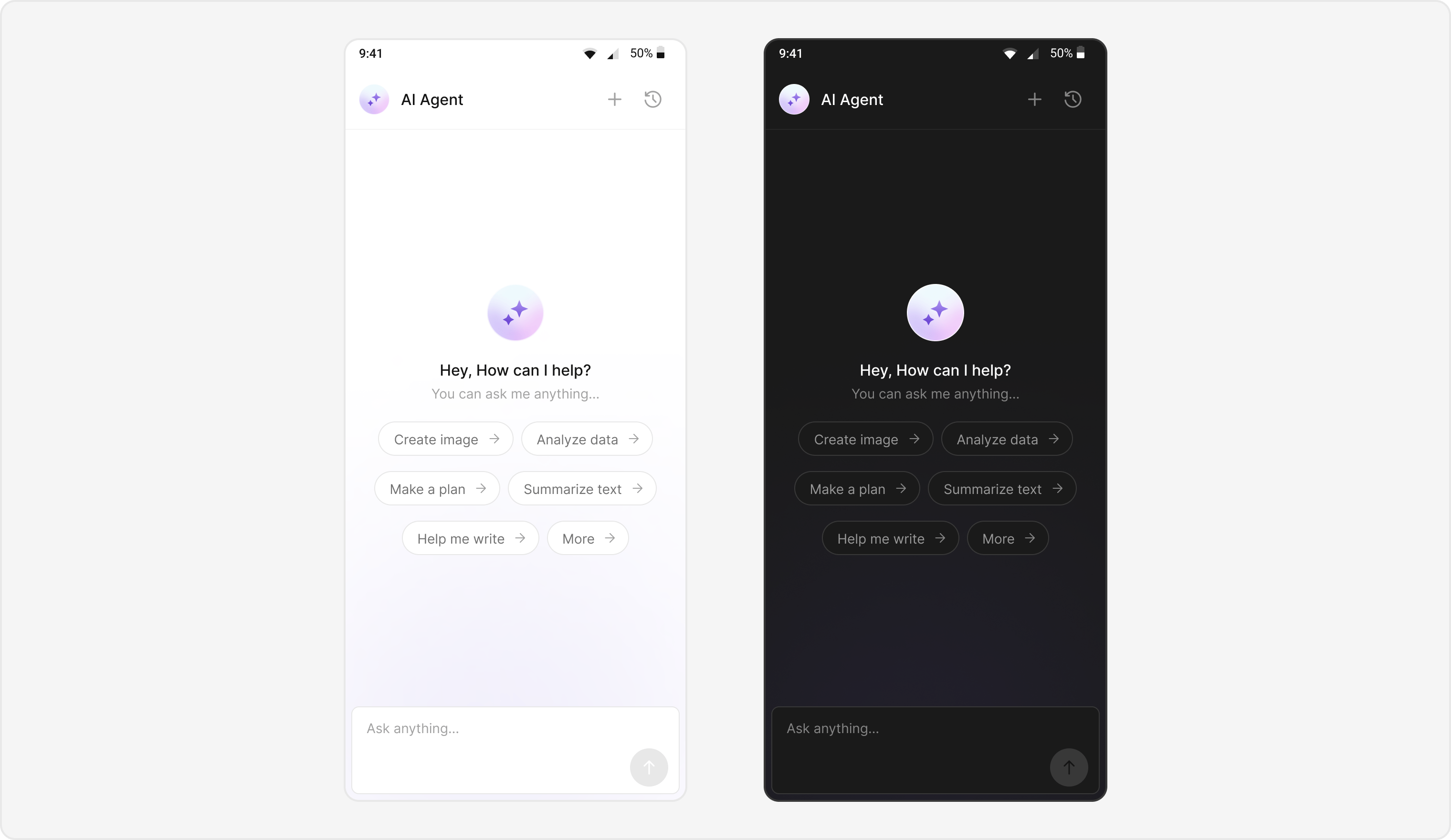
The AI Agent integration provides:- Intelligent Responses - Context-aware AI conversations
- Chat History - Browse and resume previous AI sessions
- Streaming Responses - Real-time message streaming
- Custom Styling - Match your app’s design
- Suggested Messages - Quick-start prompts for users
Basic Implementation
Create a simple AI chat screen:import UIKit
import CometChatUIKitSwift
import CometChatSDK
class AIAgentChatViewController: UIViewController {
private var user: User?
private var messageHeader: CometChatMessageHeader!
private var messageList: CometChatMessageList!
private var messageComposer: CometChatMessageComposer!
convenience init(user: User) {
self.init()
self.user = user
}
override func viewDidLoad() {
super.viewDidLoad()
view.backgroundColor = .systemBackground
setupUI()
}
private func setupUI() {
guard let user = user else { return }
// Message Header
messageHeader = CometChatMessageHeader()
messageHeader.set(user: user)
messageHeader.translatesAutoresizingMaskIntoConstraints = false
view.addSubview(messageHeader)
// Message List
messageList = CometChatMessageList()
messageList.set(user: user)
messageList.translatesAutoresizingMaskIntoConstraints = false
view.addSubview(messageList)
// Message Composer
messageComposer = CometChatMessageComposer()
messageComposer.set(user: user)
messageComposer.translatesAutoresizingMaskIntoConstraints = false
view.addSubview(messageComposer)
setupConstraints()
}
private func setupConstraints() {
NSLayoutConstraint.activate([
messageHeader.topAnchor.constraint(equalTo: view.safeAreaLayoutGuide.topAnchor),
messageHeader.leadingAnchor.constraint(equalTo: view.leadingAnchor),
messageHeader.trailingAnchor.constraint(equalTo: view.trailingAnchor),
messageHeader.heightAnchor.constraint(equalToConstant: 60),
messageList.topAnchor.constraint(equalTo: messageHeader.bottomAnchor),
messageList.leadingAnchor.constraint(equalTo: view.leadingAnchor),
messageList.trailingAnchor.constraint(equalTo: view.trailingAnchor),
messageList.bottomAnchor.constraint(equalTo: messageComposer.topAnchor),
messageComposer.leadingAnchor.constraint(equalTo: view.leadingAnchor),
messageComposer.trailingAnchor.constraint(equalTo: view.trailingAnchor),
messageComposer.bottomAnchor.constraint(equalTo: view.safeAreaLayoutGuide.bottomAnchor)
])
}
}
Production Implementation
Complete AI agent chat with history, navigation, and error handling:import UIKit
import CometChatUIKitSwift
import CometChatSDK
class ProductionAIAgentViewController: UIViewController {
// MARK: - Properties
private var user: User?
private var group: Group?
private var parentMessage: BaseMessage?
private var isHistoryMode: Bool = false
private var messageHeader: CometChatMessageHeader!
private var messageList: CometChatMessageList!
private var messageComposer: CometChatMessageComposer!
// MARK: - Initialization
convenience init(user: User, parentMessage: BaseMessage? = nil, isHistory: Bool = false) {
self.init()
self.user = user
self.parentMessage = parentMessage
self.isHistoryMode = isHistory
}
convenience init(group: Group, parentMessage: BaseMessage? = nil, isHistory: Bool = false) {
self.init()
self.group = group
self.parentMessage = parentMessage
self.isHistoryMode = isHistory
}
// MARK: - Lifecycle
override func viewDidLoad() {
super.viewDidLoad()
view.backgroundColor = .systemBackground
setupMessageHeader()
setupMessageList()
setupMessageComposer()
setupConstraints()
}
// MARK: - Setup
private func setupMessageHeader() {
messageHeader = CometChatMessageHeader()
messageHeader.translatesAutoresizingMaskIntoConstraints = false
if let user = user {
messageHeader.set(user: user)
} else if let group = group {
messageHeader.set(group: group)
}
// Back button handler
messageHeader.set(onBack: { [weak self] in
self?.navigationController?.popViewController(animated: true)
})
// Chat history button handler
messageHeader.onAiChatHistoryClicked = { [weak self] user in
self?.openChatHistory()
}
view.addSubview(messageHeader)
}
private func setupMessageList() {
messageList = CometChatMessageList()
messageList.translatesAutoresizingMaskIntoConstraints = false
messageList.hideThreadView = true
if let user = user {
messageList.set(user: user)
} else if let group = group {
messageList.set(group: group)
}
// If resuming from history, set parent message
if let parentMessage = parentMessage {
messageList.set(parentMessage: parentMessage)
}
view.addSubview(messageList)
}
private func setupMessageComposer() {
messageComposer = CometChatMessageComposer()
messageComposer.translatesAutoresizingMaskIntoConstraints = false
if let user = user {
messageComposer.set(user: user)
} else if let group = group {
messageComposer.set(group: group)
}
// If resuming from history, set parent message
if let parentMessage = parentMessage {
messageComposer.set(parentMessage: parentMessage)
}
view.addSubview(messageComposer)
}
private func setupConstraints() {
NSLayoutConstraint.activate([
messageHeader.topAnchor.constraint(equalTo: view.safeAreaLayoutGuide.topAnchor),
messageHeader.leadingAnchor.constraint(equalTo: view.leadingAnchor),
messageHeader.trailingAnchor.constraint(equalTo: view.trailingAnchor),
messageHeader.heightAnchor.constraint(equalToConstant: 60),
messageList.topAnchor.constraint(equalTo: messageHeader.bottomAnchor),
messageList.leadingAnchor.constraint(equalTo: view.leadingAnchor),
messageList.trailingAnchor.constraint(equalTo: view.trailingAnchor),
messageList.bottomAnchor.constraint(equalTo: messageComposer.topAnchor),
messageComposer.leadingAnchor.constraint(equalTo: view.leadingAnchor),
messageComposer.trailingAnchor.constraint(equalTo: view.trailingAnchor),
messageComposer.bottomAnchor.constraint(equalTo: view.safeAreaLayoutGuide.bottomAnchor)
])
}
// MARK: - Chat History
private func openChatHistory() {
let chatHistoryVC = CometChatAIAssistanceChatHistory()
if let user = user {
chatHistoryVC.set(user: user)
} else if let group = group {
chatHistoryVC.set(group: group)
}
// Handle new chat button
chatHistoryVC.onNewChatButtonClicked = { [weak self] user in
self?.startNewChat()
}
// Handle message selection to resume conversation
chatHistoryVC.onMessageClicked = { [weak self] message in
self?.resumeConversation(from: message)
}
// Handle close
chatHistoryVC.onClose = { [weak self] in
self?.navigationController?.popViewController(animated: true)
}
navigationController?.pushViewController(chatHistoryVC, animated: true)
}
private func startNewChat() {
let newChatVC: ProductionAIAgentViewController
if let user = user {
newChatVC = ProductionAIAgentViewController(user: user)
} else if let group = group {
newChatVC = ProductionAIAgentViewController(group: group)
} else {
return
}
navigationController?.pushViewController(newChatVC, animated: true)
}
private func resumeConversation(from message: BaseMessage) {
let resumeVC: ProductionAIAgentViewController
if let user = user {
resumeVC = ProductionAIAgentViewController(user: user, parentMessage: message, isHistory: true)
} else if let group = group {
resumeVC = ProductionAIAgentViewController(group: group, parentMessage: message, isHistory: true)
} else {
return
}
navigationController?.pushViewController(resumeVC, animated: true)
}
}
Launching AI Agent Chat
Start an AI agent conversation from your app:import UIKit
import CometChatUIKitSwift
import CometChatSDK
class ChatListViewController: UIViewController {
func openAIAgentChat(agentUID: String) {
// Fetch the AI agent user
CometChat.getUser(UID: agentUID) { [weak self] user in
DispatchQueue.main.async {
// Check if user is an AI agent (role contains "agentic")
if user.role?.lowercased().contains("agentic") == true {
let aiChatVC = ProductionAIAgentViewController(user: user)
self?.navigationController?.pushViewController(aiChatVC, animated: true)
} else {
// Regular user chat
let messages = CometChatMessages()
messages.set(user: user)
self?.navigationController?.pushViewController(messages, animated: true)
}
}
} onError: { error in
print("Error fetching user: \(error?.errorDescription ?? "")")
}
}
func detectAndOpenChat(for user: User) {
// Detect if user is an AI agent
let isAIAgent = user.role?.lowercased().contains("agentic") == true
if isAIAgent {
let aiChatVC = ProductionAIAgentViewController(user: user)
navigationController?.pushViewController(aiChatVC, animated: true)
} else {
let messages = CometChatMessages()
messages.set(user: user)
navigationController?.pushViewController(messages, animated: true)
}
}
}
Styling
By default, all mobile UI Kits inherit font size from the operating system’s accessibility settings. However, on iOS, developers have the option to override this behavior and set custom font sizes programmatically using the
textFont property on style objects or by configuring CometChatTypography globally.import UIKit
import CometChatUIKitSwift
class AIAgentStylingExample {
func applyGlobalStyles() {
// Configure AI bubble style
var aiBubbleStyle = AIAssistantBubbleStyle()
aiBubbleStyle.backgroundColor = .clear
aiBubbleStyle.borderWidth = 1
aiBubbleStyle.borderColor = .systemBlue
aiBubbleStyle.textColor = .label
aiBubbleStyle.textFont = UIFont.systemFont(ofSize: 14)
aiBubbleStyle.cornerRadius = CometChatCornerStyle(cornerRadius: 12)
// Apply globally
CometChatAIAssistantBubble.style = aiBubbleStyle
}
func applyInstanceStyles() -> ProductionAIAgentViewController {
let aiChatVC = ProductionAIAgentViewController(user: User())
// Custom message list style
let messageListStyle = MessageListStyle()
messageListStyle.backgroundColor = UIColor.systemBackground
// Custom composer style
let composerStyle = MessageComposerStyle()
composerStyle.backgroundColor = UIColor.secondarySystemBackground
composerStyle.borderColor = UIColor.separator
composerStyle.borderWidth = 1
return aiChatVC
}
}
Style Properties
| Property | Description |
|---|---|
backgroundColor | Bubble background color |
borderWidth | Bubble border width |
borderColor | Bubble border color |
textColor | Message text color |
textFont | Message text font |
cornerRadius | Bubble corner radius |
Customization Options
Empty State View
Customize the view shown when there are no messages:let emptyView = UIView()
let label = UILabel()
label.text = "Start a conversation with AI"
label.textAlignment = .center
label.textColor = .secondaryLabel
emptyView.addSubview(label)
messageList.set(emptyStateView: emptyView)
Streaming Speed
Adjust how fast AI responses stream:// Configure streaming speed (characters per second)
messageList.set(streamingSpeed: 50)
Suggested Messages
Provide quick-start prompts for users:let suggestions = [
"What can you help me with?",
"Tell me about your capabilities",
"How do I get started?"
]
messageComposer.set(suggestedMessages: suggestions)
AI Assistant Tools
Configure custom tools for the AI agent:messageComposer.set(aiAssistantTools: { message in
// Return custom tools based on context
return [
AITool(name: "search", description: "Search knowledge base"),
AITool(name: "calculate", description: "Perform calculations")
]
})
Chat History Component
TheCometChatAIAssistanceChatHistory component displays previous AI conversations:
import UIKit
import CometChatUIKitSwift
import CometChatSDK

class ChatHistoryViewController: UIViewController {

    private var user: User?

    convenience init(user: User) {
        self.init()
        self.user = user
    }

    override func viewDidLoad() {
        super.viewDidLoad()
        setupChatHistory()
    }

    private func setupChatHistory() {
        guard let user = user else { return }

        let chatHistory = CometChatAIAssistanceChatHistory()
        chatHistory.set(user: user)

        // New chat button
        chatHistory.onNewChatButtonClicked = { [weak self] user in
            let newChat = ProductionAIAgentViewController(user: user)
            self?.navigationController?.pushViewController(newChat, animated: true)
        }

        // Resume conversation
        chatHistory.onMessageClicked = { [weak self] message in
            let resumeChat = ProductionAIAgentViewController(
                user: user,
                parentMessage: message,
                isHistory: true
            )
            self?.navigationController?.pushViewController(resumeChat, animated: true)
        }

        // Close handler
        chatHistory.onClose = { [weak self] in
            self?.dismiss(animated: true)
        }

        addChild(chatHistory)
        view.addSubview(chatHistory.view)
        chatHistory.view.frame = view.bounds
        chatHistory.didMove(toParent: self)
    }
}
Implementation Flow
| Step | Action |
|---|---|
| 1 | User selects AI agent from chat list |
| 2 | Detect agent by checking user role for “agentic” |
| 3 | Launch ProductionAIAgentViewController |
| 4 | Configure header, message list, and composer |
| 5 | User sends message, AI responds with streaming |
| 6 | Access chat history via header button |
Components Reference
| Component | Purpose |
|---|---|
CometChatMessageHeader | Navigation and chat history access |
CometChatMessageList | Display messages with AI responses |
CometChatMessageComposer | Send messages to AI agent |
CometChatAIAssistanceChatHistory | Browse previous AI conversations |
CometChatAIAssistantBubble | AI message bubble styling |
Related Guides
AI Features
Overview of all AI-powered features
AI Chat History
Browse and resume AI conversations
Message List
Display and customize chat messages