

AI Integration Quick Reference
AI Integration Quick Reference
Where It Fits
CometChatOutgoingCall is a call-initiation component. It renders the outgoing call screen and transitions to the ongoing call screen when the receiver accepts. Wire it to CometChatCallEvents to handle call-accepted and call-rejected transitions.
- Kotlin
- Java
CallActivity.kt
Quick Start
Add the component to your layout XML:layout_activity.xml
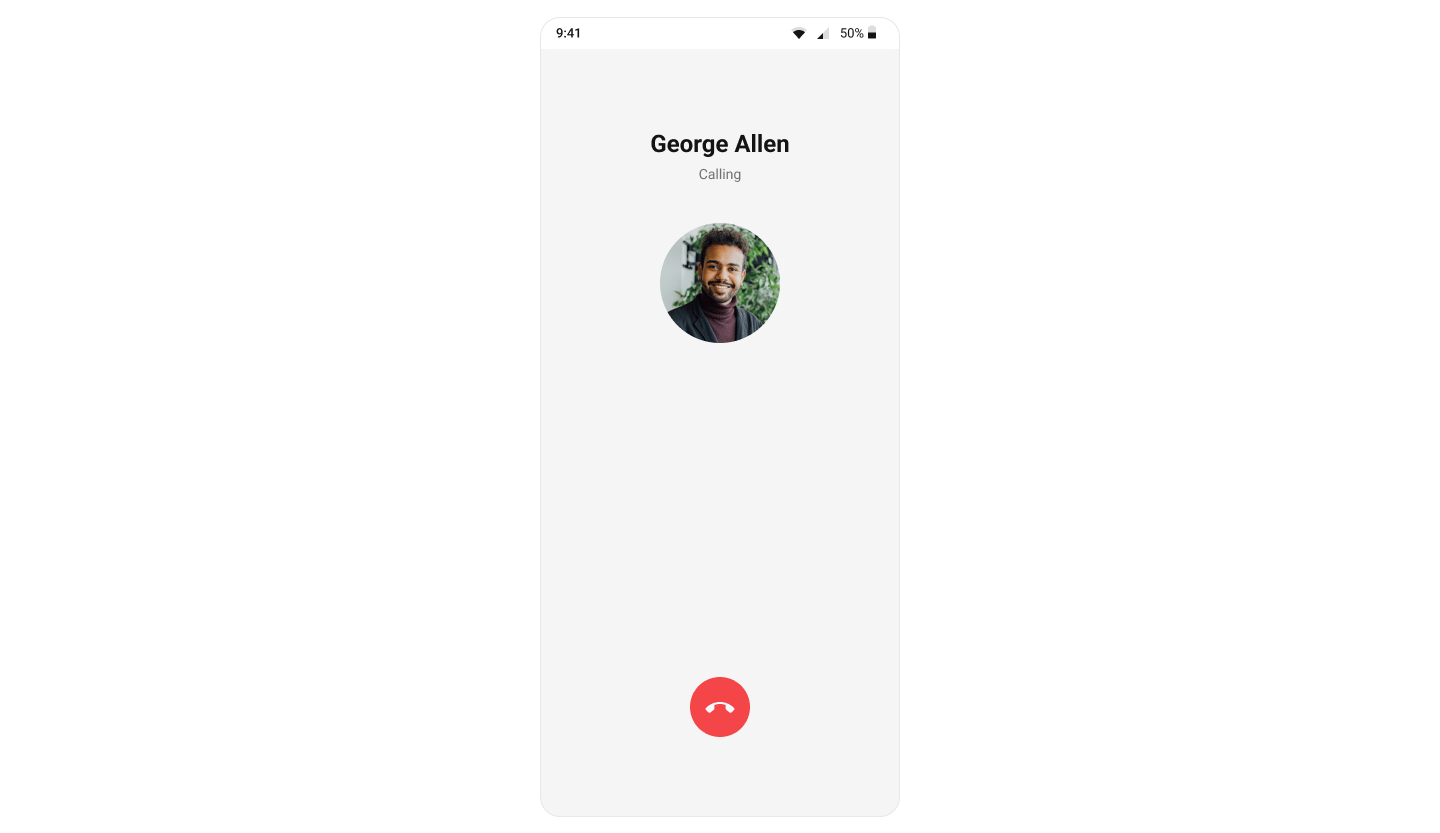
CometChatUIKit.init(), a user logged in, and the cometchat-chat-uikit-android dependency added.
To add programmatically in an Activity:
- Kotlin
- Java
YourActivity.kt
- Kotlin
- Java
YourFragment.kt
Actions and Events
Callback Methods
setOnEndCallClick
Fires when the end-call button is tapped. Default: cancels the outgoing call via the SDK.
- Kotlin
- Java
YourActivity.kt
What this does: Replaces the default end-call button behavior. When the user taps the end-call button, your custom OnClick lambda executes instead of the built-in call cancellation.
setOnError
Fires on internal errors (network failure, auth issue, SDK exception).
- Kotlin
- Java
YourActivity.kt
What this does: Registers an error callback on theCometChatOutgoingCallinstance. When an error occurs within the component, theonErrormethod is invoked with theCometChatExceptioncontaining error details.
- Verify: After setting an action callback, trigger the corresponding user interaction (tap end-call, cause an error) and confirm your custom logic executes instead of the default behavior.
Global UI Events (CometChatCallEvents)
CometChatCallEvents emits events subscribable from anywhere in the application. Add a listener and remove it when no longer needed.
- Kotlin
- Java
Add Listener
SDK Events
The component listens to SDK call events internally. No manual attachment needed unless additional side effects are required.Functionality
Small functional customizations for sound and call behavior.- Verify: After calling
disableSoundForCall(true), initiate an outgoing call and confirm no ringtone plays.
Custom View Slots
Each slot replaces a section of the default UI. All view slots accept aFunction2<Context, Call, View> that receives the current context and Call object and returns a custom View.
setTitleView
Replace the name / title text area.
- Kotlin
- Java
YourActivity.kt
What this does: Registers a callback that receives theExample with sender and receiver names:ContextandCallobject and returns a customViewto replace the default title area on the outgoing call screen.
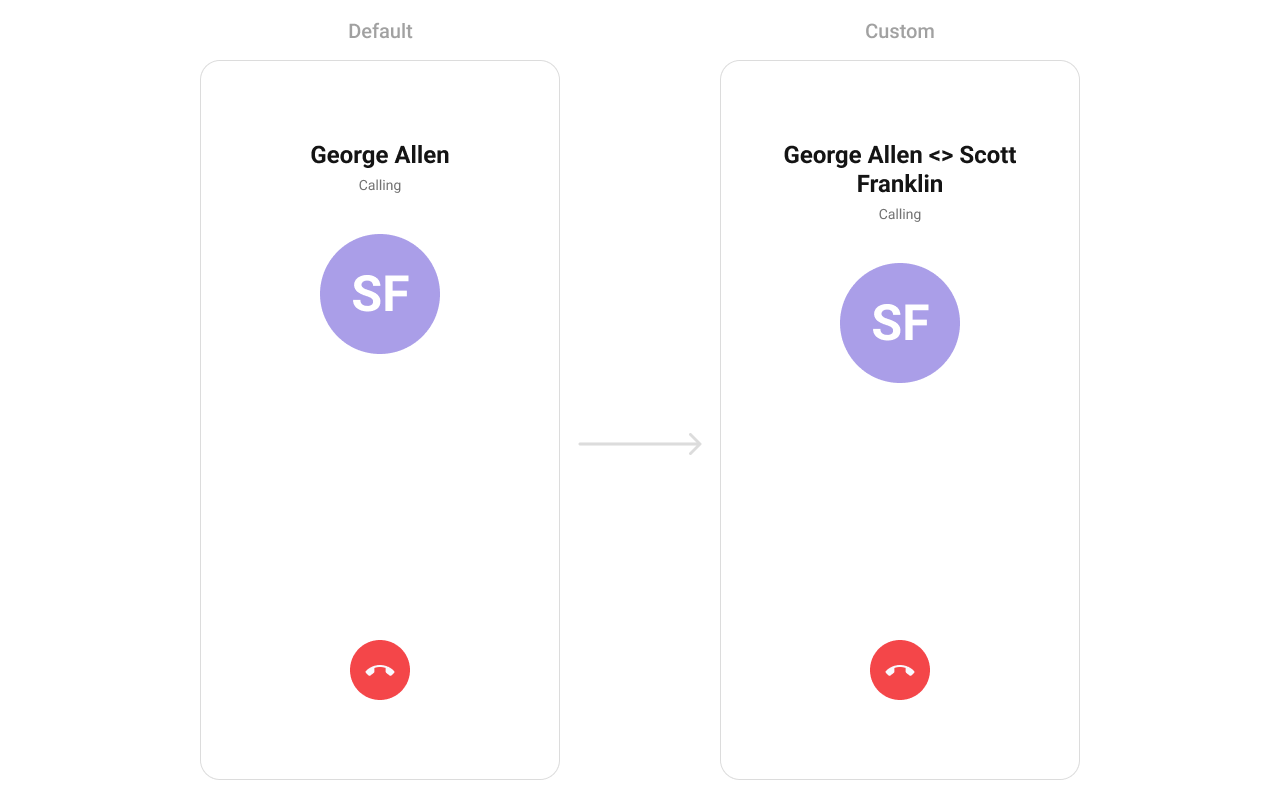
custom_title_view.xml layout:
custom_title_view.xml
- Kotlin
- Java
YourActivity.kt
What this does: Inflates thecustom_title_viewlayout, retrieves the call receiver’s name and the sender’s UID, and sets the title text to display them separated by" <> ".
setSubtitleView
Replace the subtitle text below the title.
- Kotlin
- Java
YourActivity.kt
What this does: Registers a callback that receives theExample with call-type icon and “Calling…” text:ContextandCallobject and returns a customViewto replace the default subtitle area on the outgoing call screen.
custom_subtitle_view.xml layout:
custom_subtitle_view.xml
- Kotlin
- Java
YourActivity.kt
What this does: Inflates thecustom_subtitle_viewlayout, sets the subtitle text to “Calling…”, and displays a voice call icon if the call type isCALL_TYPE_AUDIO, or a video call icon otherwise.
setAvatarView
Replace the avatar / profile picture area.
- Kotlin
- Java
YourActivity.kt
What this does: Registers a callback that receives theExample with admin badge:ContextandCallobject and returns a customViewto replace the default avatar area on the outgoing call screen.
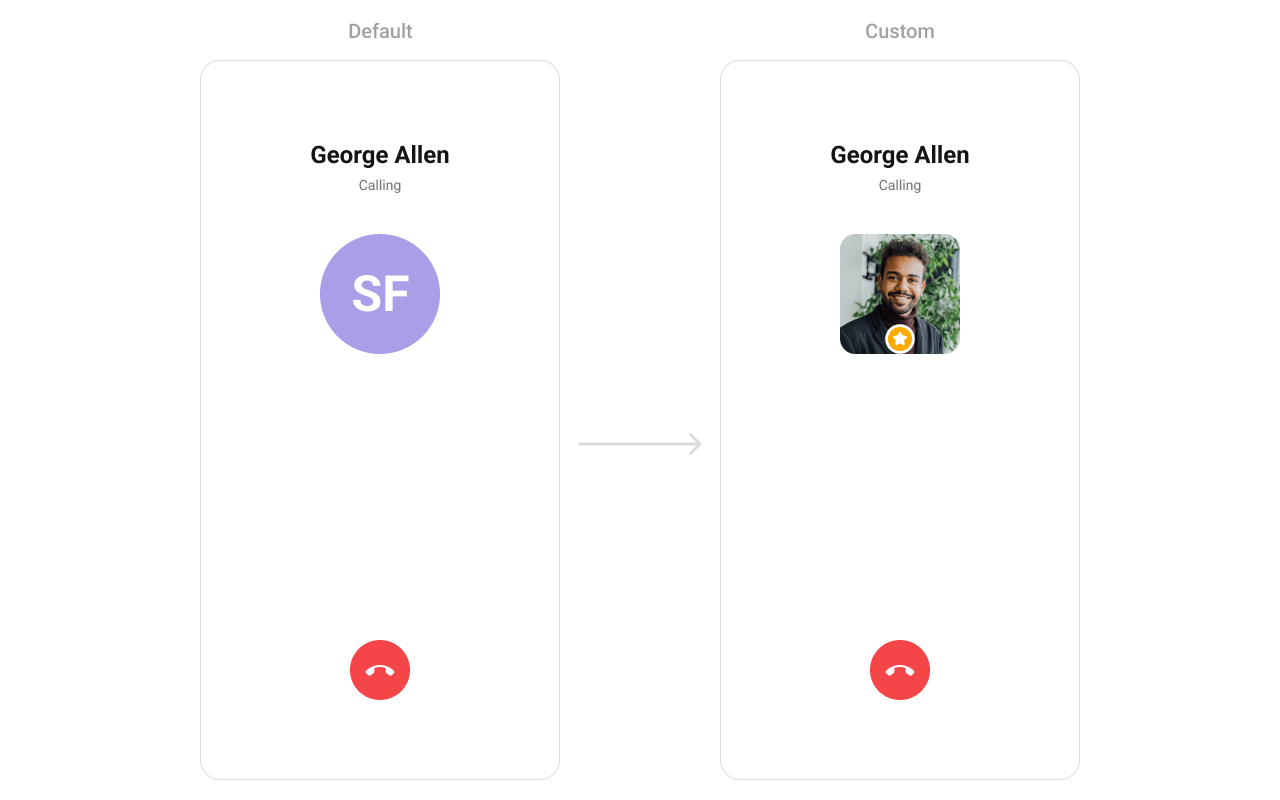
custom_avatar_view.xml layout:
custom_avatar_view.xml
- Kotlin
- Java
YourActivity.kt
What this does: Inflates thecustom_avatar_viewlayout, retrieves the call receiver’s UID and avatar URL, sets them on theCometChatAvatarwidget, and applies centered layout params.
setEndCallView
Replace the end-call button.
- Kotlin
- Java
YourActivity.kt
What this does: Registers a callback that receives theExample with custom end-call card:ContextandCallobject and returns a customViewto replace the default end-call button on the outgoing call screen.
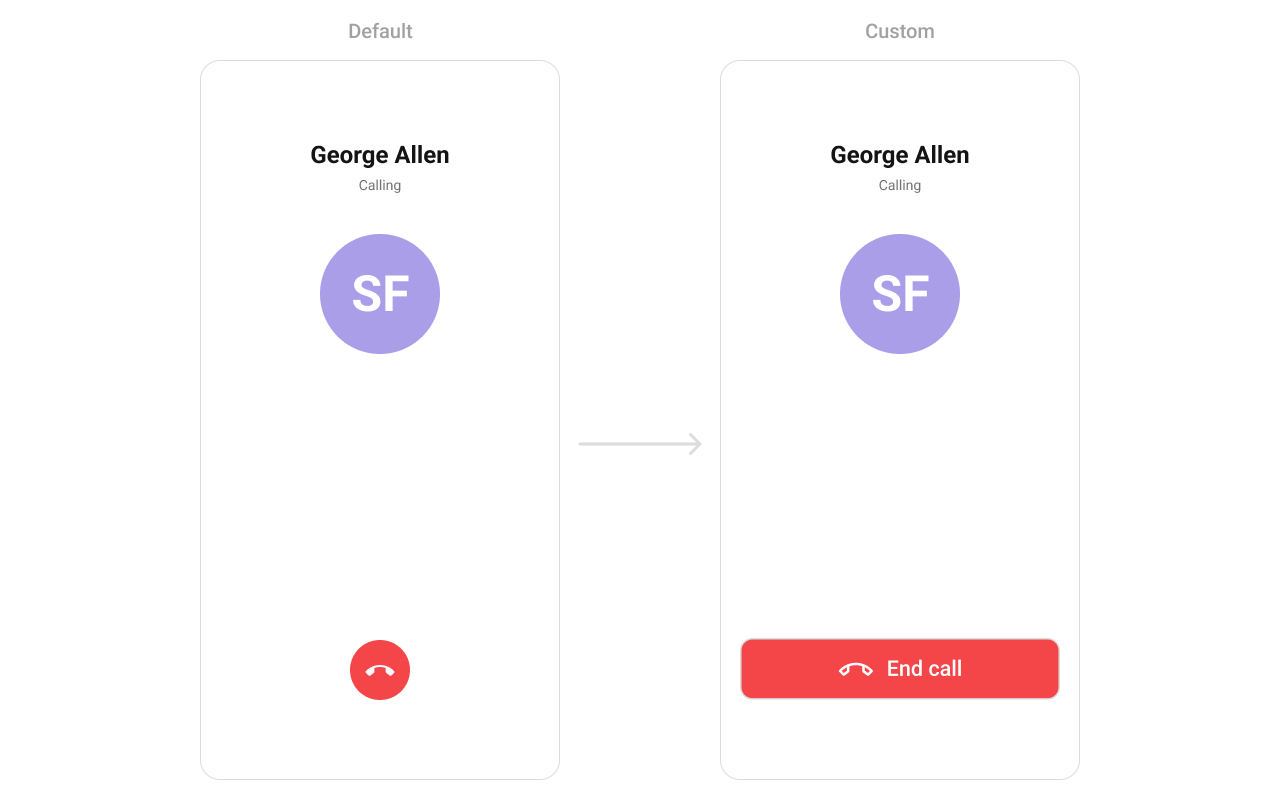
end_call_button.xml layout:
end_call_button.xml
- Kotlin
- Java
YourActivity.kt
What this does: Inflates the end_call_button layout, attaches a click listener that shows a toast message “End call clicked”, sets a 40dp bottom margin, and returns the custom end-call button view.
- Verify: After setting any custom view slot, confirm the custom view renders in the correct position on the outgoing call screen and that the data binding populates correctly.
Common Patterns
Silent outgoing call
- Kotlin
- Java
Custom ringtone
- Kotlin
- Java
Custom call settings for ongoing call
- Kotlin
- Java
Handle end-call with custom navigation
- Kotlin
- Java
Advanced Methods
setCall
Sets the call object and extracts the receiver User automatically. Use this when you have a Call object from the SDK.
- Kotlin
- Java
setCallinternally extracts the receiver from theCallobject and callssetUserwith it. The component then displays the receiver’s name and avatar.
setUser
Sets the user directly when you don’t have a Call object. The uid, name, and avatar fields are required.
- Kotlin
- Java
setCallSettingsBuilder
Configures the ongoing call settings (audio mode, video settings, etc.) that apply once the call is accepted.
- Kotlin
- Java
setCustomSoundForCalls
Sets a custom ringtone sound that plays while the outgoing call is ringing.
- Kotlin
- Java
disposeObservers
Removes lifecycle observers manually. Normally handled automatically when the view detaches from the window.
- Kotlin
- Java
Internal Access
Use this only when the standard API is insufficient. Directly manipulating the ViewModel may conflict with the component’s internal state management.
Style
The component uses XML theme styles. Define a custom style with parentCometChatOutgoingCallStyle in themes.xml, then apply with setStyle().
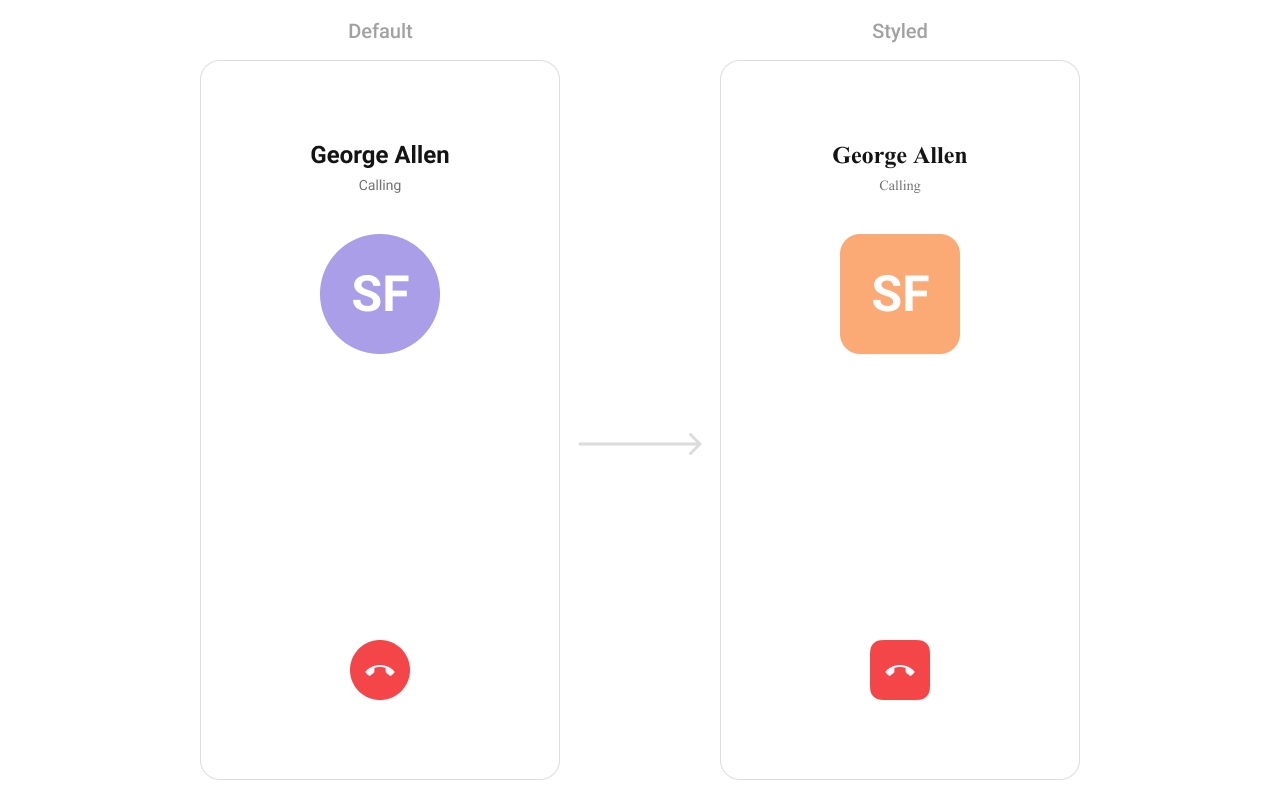
themes.xml
- Kotlin
- Java
Programmatic Style Properties
In addition to XML theme styles, the component exposes programmatic setters for fine-grained control:Customization Matrix
Next Steps
Incoming Call
Incoming call notification with accept/reject
Call Buttons
Voice and video call initiation buttons
Call Logs
View call history
Conversations
Browse recent conversations