

AI Integration Quick Reference
AI Integration Quick Reference
{
  "component": "CometChatMessageTemplate",
  "kind": "model-class",
  "package": "@cometchat/chat-uikit-react",
  "import": "import { CometChatMessageTemplate } from \"@cometchat/chat-uikit-react\";",
  "description": "Data structure defining how message bubbles render in CometChatMessageList. Each template maps a type+category pair to view functions.",
  "usage": "Pass an array of CometChatMessageTemplate instances to CometChatMessageList via the templates prop.",
  "properties": {
    "type": { "type": "string", "required": true, "description": "CometChat message type" },
    "category": { "type": "string", "default": "\"\"", "description": "CometChat message category" },
    "headerView": { "type": "function | null", "default": "null", "description": "Custom header view function" },
    "contentView": { "type": "function | null", "default": "null", "description": "Custom content view function" },
    "footerView": { "type": "function | null", "default": "null", "description": "Custom footer view function" },
    "bottomView": { "type": "function | null", "default": "null", "description": "Custom bottom view function" },
    "bubbleView": { "type": "function | null", "default": "null", "description": "Replaces entire bubble" },
    "statusInfoView": { "type": "function | null", "default": "null", "description": "Custom status info view function" },
    "replyView": { "type": "function | null", "default": "null", "description": "Custom reply preview function" },
    "options": { "type": "function", "description": "Returns action sheet items for long-press" }
  },
  "relatedComponents": ["CometChatMessageList"],
  "cssRootClass": null,
  "events": null
}
What It Is
CometChatMessageTemplate is a model class, not a rendered component. Each instance maps a message type + category pair to a set of view functions that control how that message renders inside CometChatMessageList. Pass an array of templates to the templates prop on CometChatMessageList.
import { useState, useEffect } from "react";
import {
  CometChatMessageList,
  CometChatMessageTemplate,
  CometChatUIKit,
  CometChatUIKitConstants,
} from "@cometchat/chat-uikit-react";
import { CometChat } from "@cometchat/chat-sdk-javascript";

function CustomTemplateDemo() {
  const [chatGroup, setChatGroup] = useState<CometChat.Group>();
  const [templates, setTemplates] = useState<CometChatMessageTemplate[]>([]);

  useEffect(() => {
    CometChat.getGroup("guid").then((group) => setChatGroup(group));

    const allTemplates = CometChatUIKit.getDataSource().getAllMessageTemplates();
    const modified = allTemplates.map((t) => {
      if (
        t.type === CometChatUIKitConstants.MessageTypes.text &&
        t.category === CometChatUIKitConstants.MessageCategory.message
      ) {
        t.headerView = (message: CometChat.BaseMessage) => (
          <>{message.getSender().getName()} • 🗓️ In meeting</>
        );
      }
      return t;
    });
    setTemplates(modified);
  }, []);

  if (!chatGroup) return null;

  return <CometChatMessageList group={chatGroup} templates={templates} />;
}
Template Structure
A message bubble is composed of these view slots, each overridable per template:| View | Default rendering | Signature |
|---|---|---|
headerView | Sender name | (message: CometChat.BaseMessage, alignment: MessageBubbleAlignment, textFormatters?: CometChatTextFormatter[]) => JSX.Element | null |
contentView | Text / image / video / audio / file bubble | (message: CometChat.BaseMessage, alignment: MessageBubbleAlignment, textFormatters?: CometChatTextFormatter[]) => JSX.Element | null |
footerView | Reactions | (message: CometChat.BaseMessage, alignment: MessageBubbleAlignment) => JSX.Element | null |
bottomView | Link previews, “load more” | (message: CometChat.BaseMessage, alignment: MessageBubbleAlignment) => JSX.Element | null |
statusInfoView | Receipt + timestamp | (message: CometChat.BaseMessage, alignment: MessageBubbleAlignment, hideReceipts?: boolean, messageSentAtDateTimeFormat?: CalendarObject, showError?: boolean) => JSX.Element | null |
replyView | Reply preview | (message: CometChat.BaseMessage, alignment?: MessageBubbleAlignment, onReplyViewClicked?: (msg: CometChat.BaseMessage) => void, textFormatters?: CometChatTextFormatter[]) => JSX.Element | null |
bubbleView | Entire bubble (overrides all above) | (message: CometChat.BaseMessage, alignment: MessageBubbleAlignment) => JSX.Element | null |
options | Long-press action sheet | (loggedInUser: CometChat.User, message: CometChat.BaseMessage, group?: CometChat.Group) => CometChatMessageOption[] |
Fetching Existing Templates
Retrieve the built-in templates and modify specific ones:import {
CometChatUIKit,
CometChatUIKitConstants,
CometChatMessageTemplate,
} from "@cometchat/chat-uikit-react";
const allTemplates: CometChatMessageTemplate[] =
CometChatUIKit.getDataSource().getAllMessageTemplates();
for (let i = 0; i < allTemplates.length; i++) {
if (allTemplates[i].type === CometChatUIKitConstants.MessageTypes.text) {
// customize allTemplates[i]
}
}
Common Patterns
Custom header with status badge

import { useState, useEffect } from "react";
import {
  CometChatMessageList,
  CometChatUIKit,
  CometChatUIKitConstants,
  CometChatMessageTemplate,
} from "@cometchat/chat-uikit-react";
import { CometChat } from "@cometchat/chat-sdk-javascript";

function HeaderViewDemo() {
  const [chatGroup, setChatGroup] = useState<CometChat.Group>();
  const [templates, setTemplates] = useState<CometChatMessageTemplate[]>([]);

  useEffect(() => {
    CometChat.getGroup("guid").then((group) => setChatGroup(group));

    const definedTemplates = CometChatUIKit.getDataSource().getAllMessageTemplates();
    const modified = definedTemplates.map((t) => {
      if (
        t.type === CometChatUIKitConstants.MessageTypes.text &&
        t.category === CometChatUIKitConstants.MessageCategory.message
      ) {
        t.headerView = (message: CometChat.BaseMessage) => (
          <>{message.getSender().getName()} • 🗓️ In meeting</>
        );
      }
      return t;
    });
    setTemplates(modified);
  }, []);

  if (!chatGroup) return null;

  return <CometChatMessageList group={chatGroup} templates={templates} />;
}
Custom content view for a custom message type
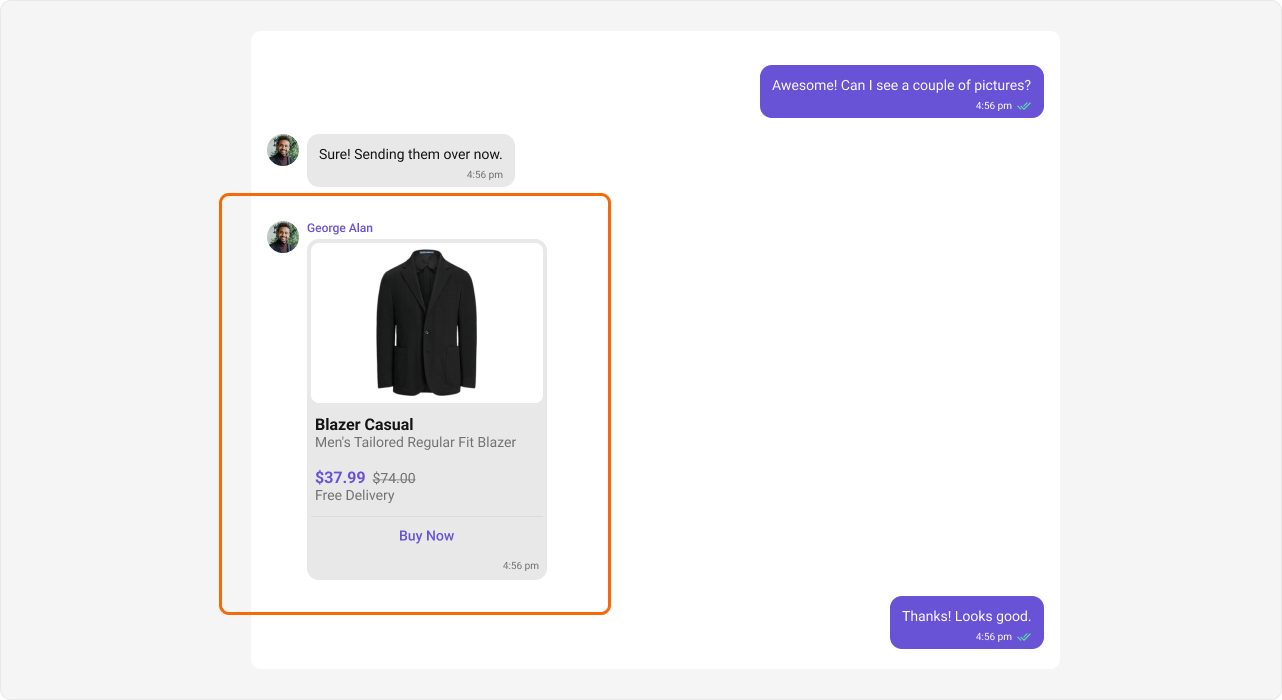
- TypeScript
- CSS
import { useState, useEffect } from "react";
import {
  CometChatMessageList,
  CometChatUIKit,
  CometChatUIKitConstants,
  CometChatMessageTemplate,
} from "@cometchat/chat-uikit-react";
import { CometChat } from "@cometchat/chat-sdk-javascript";

function ContentViewDemo() {
  const [chatGroup, setChatGroup] = useState<CometChat.Group>();
  const [templates, setTemplates] = useState<CometChatMessageTemplate[]>([]);

  useEffect(() => {
    CometChat.getGroup("guid").then((group) => setChatGroup(group));

    const definedTemplates = CometChatUIKit.getDataSource().getAllMessageTemplates();
    const CUSTOM_MESSAGE_TYPE = "customType";
    const customTemplate = new CometChatMessageTemplate({
      type: CUSTOM_MESSAGE_TYPE,
      category: CometChatUIKitConstants.MessageCategory.custom,
      contentView: (message: CometChat.BaseMessage) => (
        <div className="content-view">
          <div className="content-view__body">
            <div className="content-view__body-title">Blazer Casual</div>
            <div className="content-view__body-description">
              Men's Tailored Regular Fit Blazer
            </div>
            <div className="content-view__body-price">
              $37.99 <span className="content-view__body-price-old">$74.00</span>
            </div>
          </div>
          <div className="content-footer">Buy now</div>
        </div>
      ),
    });
    definedTemplates.push(customTemplate);
    setTemplates(definedTemplates);
  }, []);

  const getMessageRequestBuilder = () => {
    const CUSTOM_MESSAGE_TYPE = "customType";
    const categories = CometChatUIKit.getDataSource().getAllMessageCategories();
    categories.push(CometChatUIKitConstants.MessageCategory.custom);
    const types = CometChatUIKit.getDataSource().getAllMessageTypes();
    types.push(CUSTOM_MESSAGE_TYPE);
    return new CometChat.MessagesRequestBuilder()
      .setCategories(categories)
      .setTypes(types)
      .hideReplies(true)
      .setLimit(30);
  };

  if (!chatGroup) return null;

  return (
    <CometChatMessageList
      group={chatGroup}
      templates={templates}
      messagesRequestBuilder={getMessageRequestBuilder()}
    />
  );
}
.content-view__body {
  height: 105px;
  display: flex;
  padding: 12px 4px;
  flex-direction: column;
  text-align: left;
  gap: 16px;
}

.content-view__body-title {
  color: #141414;
  font: 700 16px/1.2 Roboto;
}

.content-view__body-description {
  color: #727272;
  font: 400 14px/1.2 Roboto;
}

.content-view__body-price {
  color: #6852d6;
  font: 700 16px/1.2 Roboto;
}

.content-view__body-price-old {
  color: #727272;
  font: 400 14px/1.2 Roboto;
  text-decoration: line-through;
}

.content-footer {
  display: flex;
  height: 40px;
  padding: 8px 20px;
  justify-content: center;
  align-items: center;
  border-top: 1px solid #dcdcdc;
  color: #6852d6;
  font: 500 14px/1.2 Roboto;
}
Custom bottom view with warning

- TypeScript
- CSS
import { useState, useEffect } from "react";
import {
  CometChatMessageList,
  CometChatUIKit,
  CometChatUIKitConstants,
  CometChatMessageTemplate,
} from "@cometchat/chat-uikit-react";
import { CometChat } from "@cometchat/chat-sdk-javascript";

function BottomViewDemo() {
  const [chatGroup, setChatGroup] = useState<CometChat.Group>();
  const [templates, setTemplates] = useState<CometChatMessageTemplate[]>([]);

  useEffect(() => {
    CometChat.getGroup("guid").then((group) => setChatGroup(group));

    const definedTemplates = CometChatUIKit.getDataSource().getAllMessageTemplates();
    const modified = definedTemplates.map((t) => {
      if (
        t.type === CometChatUIKitConstants.MessageTypes.text &&
        t.category === CometChatUIKitConstants.MessageCategory.message
      ) {
        t.bottomView = (message: CometChat.BaseMessage) => (
          <div className="bottom-view">
            <span className="error-icon"> </span> According to guidelines you cannot share contact
          </div>
        );
      }
      return t;
    });
    setTemplates(modified);
  }, []);

  if (!chatGroup) return null;

  return <CometChatMessageList group={chatGroup} templates={templates} />;
}
.cometchat .cometchat-message-bubble__body {
  border-radius: 12px 12px 0px 0px;
}

.bottom-view {
  display: flex;
  height: 19px;
  align-items: center;
  gap: 4px;
  color: #f44649;
  font: 400 12px/120% Roboto;
  border-radius: 0px 0px 12px 12px;
  background: linear-gradient(
      0deg,
      rgba(244, 70, 73, 0.2) 0%,
      rgba(244, 70, 73, 0.2) 100%
    ),
    #fff;
  padding: 0px 8px 0px 5px;
}
Replace entire bubble

- TypeScript
- CSS
import { useState, useEffect } from "react";
import {
  CometChatMessageList,
  CometChatUIKit,
  CometChatUIKitConstants,
  CometChatMessageTemplate,
  MessageBubbleAlignment,
  CometChatUIKitLoginListener,
  MessageReceiptUtils,
  Receipts,
  isMessageSentByMe,
} from "@cometchat/chat-uikit-react";
import { CometChat } from "@cometchat/chat-sdk-javascript";

function BubbleViewDemo() {
  const [chatGroup, setChatGroup] = useState<CometChat.Group>();
  const [templates, setTemplates] = useState<CometChatMessageTemplate[]>([]);

  useEffect(() => {
    CometChat.getGroup("guid").then((group) => setChatGroup(group));

    const definedTemplates = CometChatUIKit.getDataSource().getAllMessageTemplates();
    const modified = definedTemplates.map((t) => {
      if (
        t.type === CometChatUIKitConstants.MessageTypes.text &&
        t.category === CometChatUIKitConstants.MessageCategory.message
      ) {
        t.bubbleView = (
          message: CometChat.BaseMessage,
          alignment: MessageBubbleAlignment
        ) => {
          const isSentByMe = isMessageSentByMe(
            message,
            CometChatUIKitLoginListener.getLoggedInUser()!
          );
          let textMessage = "";
          if (message instanceof CometChat.TextMessage) {
            textMessage = message.getText();
          }
          return (
            <div className={`bubble-view ${isSentByMe ? "bubble-view__outgoing" : "bubble-view__incoming"}`}>
              <div className="bubble-view__content">
                <div className="bubble-view__content__text">{textMessage}</div>
              </div>
            </div>
          );
        };
      }
      return t;
    });
    setTemplates(modified);
  }, []);

  if (!chatGroup) return null;

  return <CometChatMessageList group={chatGroup} templates={templates} />;
}
.bubble-view {
  display: flex;
  flex-direction: column;
  width: 100%;
  padding: 20px;
  gap: 12px;
}

.bubble-view__outgoing {
  align-items: flex-end;
}

.bubble-view__incoming {
  align-items: flex-start;
}

.bubble-view__content {
  max-width: 60%;
  display: flex;
  flex-direction: column;
  align-items: flex-end;
}

.bubble-view__content__text {
  width: fit-content;
  padding: 4px;
  border-radius: 2px 2px 0px 2px;
  background: #6852d6;
  color: white;
}

.bubble-view__incoming .bubble-view__content__text {
  background-color: #e8e8e8;
  color: #141414;
}
Custom action sheet options
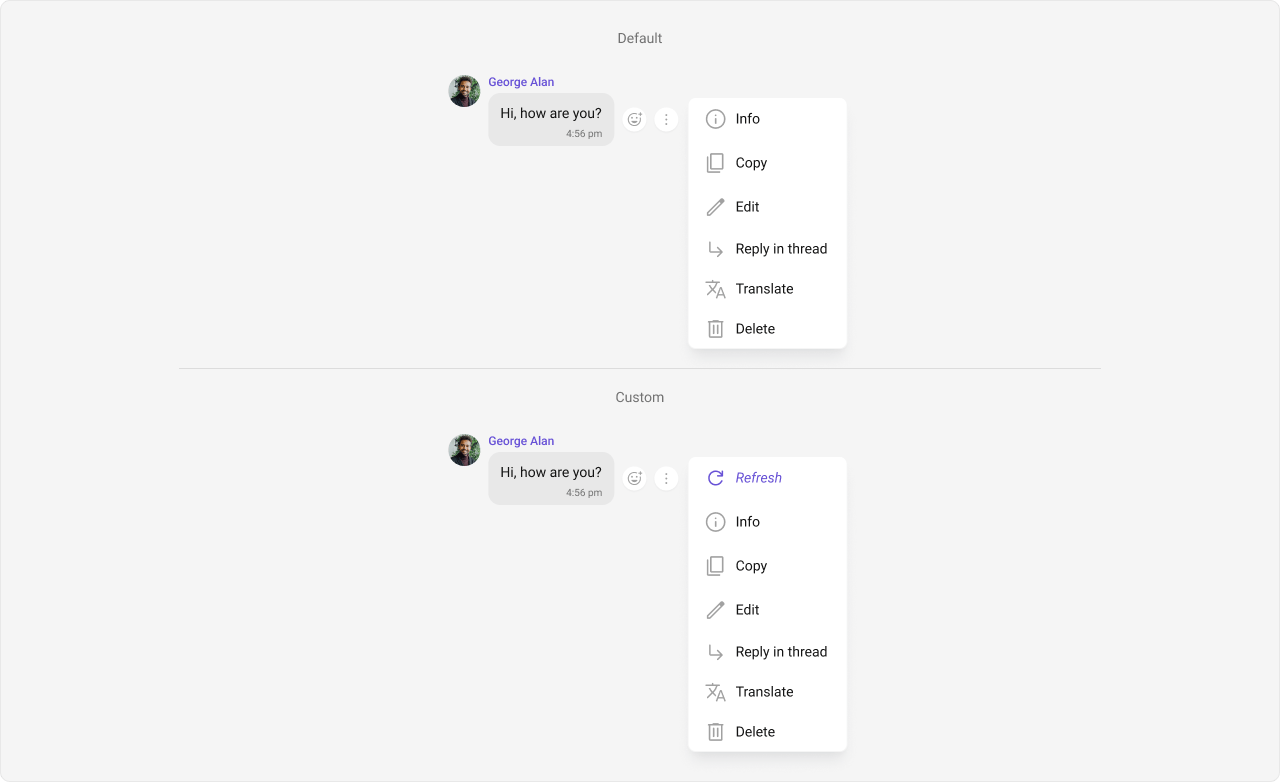
import { useState, useEffect } from "react";
import {
  CometChatMessageList,
  CometChatUIKit,
  CometChatUIKitConstants,
  CometChatMessageTemplate,
  CometChatActionsIcon,
} from "@cometchat/chat-uikit-react";
import { CometChat } from "@cometchat/chat-sdk-javascript";

function OptionsDemo() {
  const [chatGroup, setChatGroup] = useState<CometChat.Group>();
  const [templates, setTemplates] = useState<CometChatMessageTemplate[]>([]);

  useEffect(() => {
    CometChat.getGroup("guid").then((group) => setChatGroup(group));

    const definedTemplates = CometChatUIKit.getDataSource().getAllMessageTemplates();
    const modified = definedTemplates.map((t) => {
      if (
        t.type === CometChatUIKitConstants.MessageTypes.text &&
        t.category === CometChatUIKitConstants.MessageCategory.message
      ) {
        t.options = (
          loggedInUser: CometChat.User,
          message: CometChat.BaseMessage,
          group?: CometChat.Group
        ) => {
          const defaultOptions: any =
            CometChatUIKit.getDataSource().getMessageOptions(loggedInUser, message, group);
          const myView: any = new CometChatActionsIcon({
            id: "refresh",
            title: "Refresh",
            iconURL: "",
            onClick: () => { /* custom logic */ },
          });
          defaultOptions.splice(1, 0, myView);
          return defaultOptions;
        };
      }
      return t;
    });
    setTemplates(modified);
  }, []);

  if (!chatGroup) return null;

  return <CometChatMessageList group={chatGroup} templates={templates} />;
}
New template for a custom message type
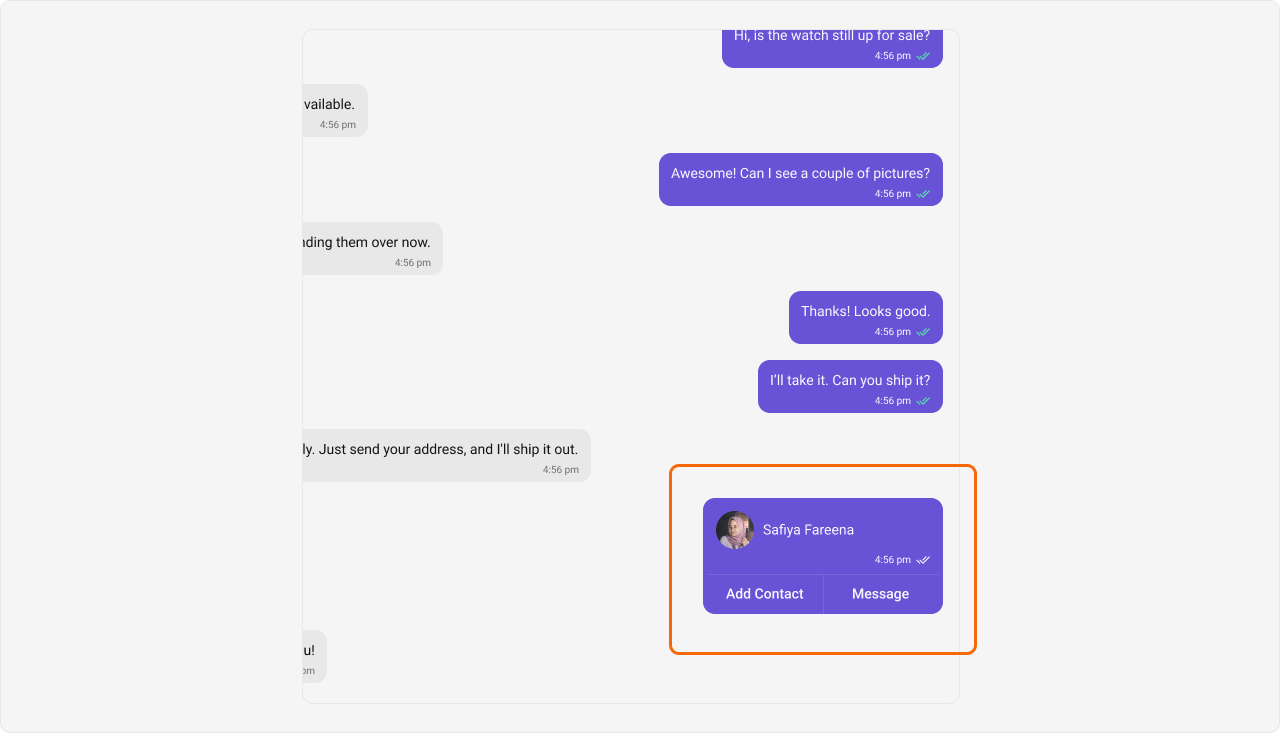
import { useState, useEffect } from "react";
import {
  CometChatMessageList,
  CometChatUIKit,
  CometChatUIKitConstants,
  CometChatMessageTemplate,
} from "@cometchat/chat-uikit-react";
import { CometChat } from "@cometchat/chat-sdk-javascript";

function NewTemplateDemo() {
  const [chatGroup, setChatGroup] = useState<CometChat.Group>();
  const [templates, setTemplates] = useState<CometChatMessageTemplate[]>([]);

  useEffect(() => {
    CometChat.getGroup("guid").then((group) => setChatGroup(group));

    const definedTemplates = CometChatUIKit.getDataSource().getAllMessageTemplates();
    const CUSTOM_MESSAGE_TYPE = "customType";
    const customTemplate = new CometChatMessageTemplate({
      type: CUSTOM_MESSAGE_TYPE,
      category: CometChatUIKitConstants.MessageCategory.custom,
      contentView: (message: CometChat.BaseMessage) => (
        <div style={{ padding: 8 }}>Custom: {JSON.stringify(message.getData())}</div>
      ),
    });
    definedTemplates.push(customTemplate);
    setTemplates(definedTemplates);
  }, []);

  const getMessageRequestBuilder = () => {
    const CUSTOM_MESSAGE_TYPE = "customType";
    const categories = CometChatUIKit.getDataSource().getAllMessageCategories();
    categories.push(CometChatUIKitConstants.MessageCategory.custom);
    const types = CometChatUIKit.getDataSource().getAllMessageTypes();
    types.push(CUSTOM_MESSAGE_TYPE);
    return new CometChat.MessagesRequestBuilder()
      .setCategories(categories)
      .setTypes(types)
      .hideReplies(true)
      .setLimit(30);
  };

  if (!chatGroup) return null;

  return (
    <CometChatMessageList
      group={chatGroup}
      templates={templates}
      messagesRequestBuilder={getMessageRequestBuilder()}
    />
  );
}
Styling
CometChatMessageTemplate renders inside .cometchat-message-bubble. Style individual bubble sections using CSS:
.cometchat .cometchat-message-bubble__body {
  /* content area overrides */
}

.cometchat .cometchat-message-bubble__body-footer-view {
  /* footer area overrides */
}

.cometchat .cometchat-message-bubble__body-header-view {
  /* header area overrides */
}
Properties
bubbleView
| Key | Value |
|---|---|
| Type | ((message: CometChat.BaseMessage, alignment: MessageBubbleAlignment) => Element | JSX.Element | null) | null |
| Default | null |
headerView, contentView, footerView, bottomView, statusInfoView, and replyView are ignored for that template.
bottomView
| Key | Value |
|---|---|
| Type | ((message: CometChat.BaseMessage, alignment: MessageBubbleAlignment) => Element | JSX.Element | null) | null |
| Default | null |
category
| Key | Value |
|---|---|
| Type | string |
| Default | "" |
CometChatUIKitConstants.MessageCategory.message, CometChatUIKitConstants.MessageCategory.custom).
contentView
| Key | Value |
|---|---|
| Type | ((message: CometChat.BaseMessage, alignment: MessageBubbleAlignment, textFormatters?: CometChatTextFormatter[]) => Element | JSX.Element | null) | null |
| Default | null |
footerView
| Key | Value |
|---|---|
| Type | ((message: CometChat.BaseMessage, alignment: MessageBubbleAlignment) => Element | JSX.Element | null) | null |
| Default | null |
headerView
| Key | Value |
|---|---|
| Type | ((message: CometChat.BaseMessage, alignment: MessageBubbleAlignment) => Element | JSX.Element | null) | null |
| Default | null |
options
| Key | Value |
|---|---|
| Type | (loggedInUser: CometChat.User, message: CometChat.BaseMessage, group?: CometChat.Group) => CometChatMessageOption[] |
| Default | SDK default options |
replyView
| Key | Value |
|---|---|
| Type | ((message: CometChat.BaseMessage, alignment?: MessageBubbleAlignment, onReplyViewClicked?: (msg: CometChat.BaseMessage) => void, textFormatters?: CometChatTextFormatter[]) => Element | JSX.Element | null) | null |
| Default | null |
statusInfoView
| Key | Value |
|---|---|
| Type | ((message: CometChat.BaseMessage, alignment: MessageBubbleAlignment, hideReceipts?: boolean, messageSentAtDateTimeFormat?: CalendarObject, showError?: boolean) => Element | JSX.Element | null) | null |
| Default | null |
type
| Key | Value |
|---|---|
| Type | string |
| Default | — (required) |
CometChatUIKitConstants.MessageTypes.text, CometChatUIKitConstants.MessageTypes.image).