AI Agent Component Spec
AI Agent Component Spec
| Field | Value |
|---|---|
| Package | cometchat_chat_uikit |
| Key class | ShortcutFormatter (extends CometChatTextFormatter) |
| Init | CometChatUIKit.init(uiKitSettings) then CometChatUIKit.login(uid) |
| Purpose | Provide !shortcut style expansions invoking extension APIs |
| Sample app | GitHub |
| Related | Custom Text Formatter · All Guides |
Introduction
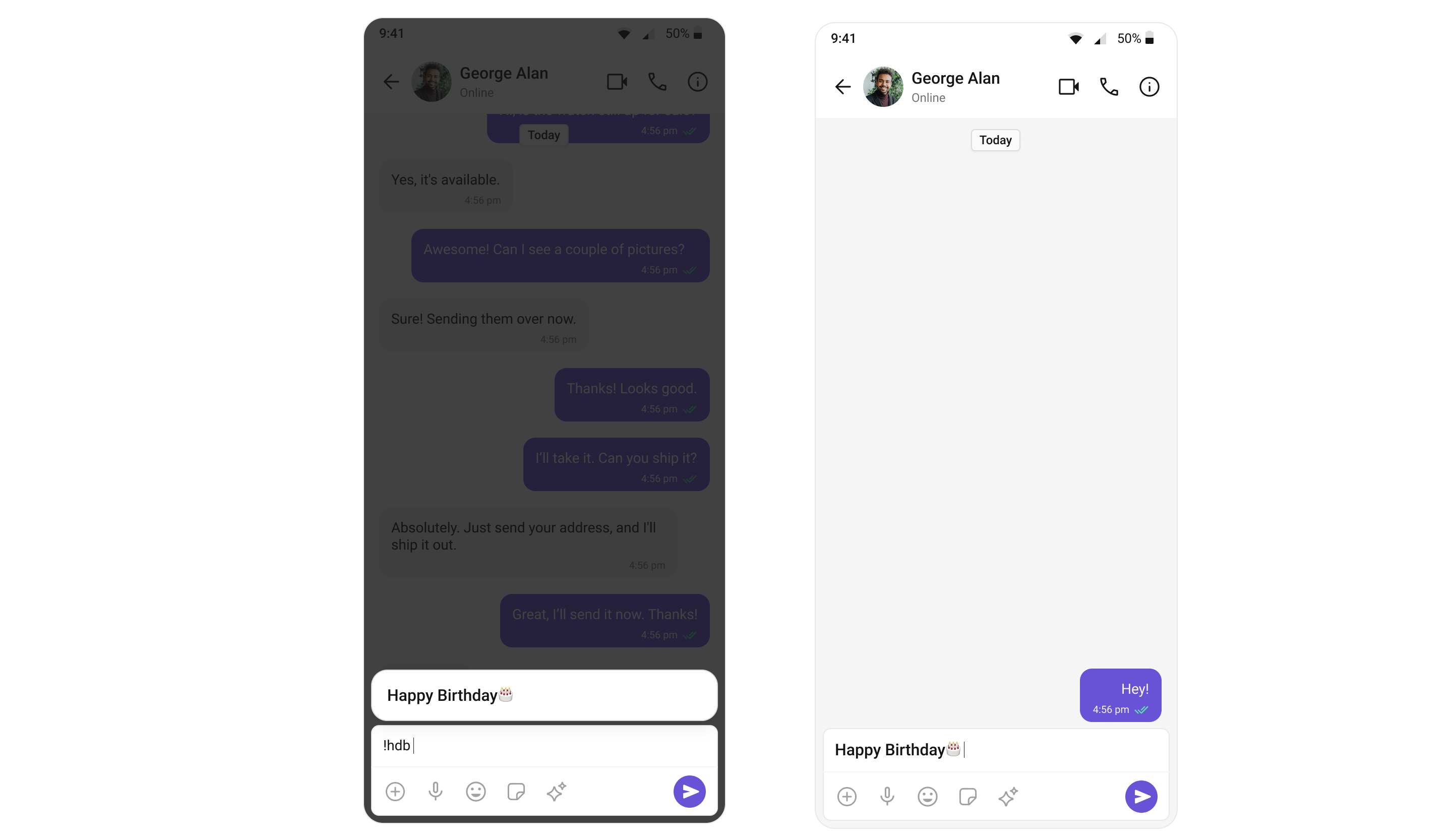
TheShortcutFormatter class extends the CometChatTextFormatter class to provide a mechanism for handling shortcuts within messages. This guide will walk you through the process of using ShortcutFormatter to implement shortcut extensions in your CometChat application.
Setup
- Create the ShortcutFormatter Class: Define the
ShortcutFormatterclass by extending theCometChatTextFormatterclass.
- Dart
import 'package:cometchat_chat_uikit/cometchat_chat_uikit.dart';

class ShortcutFormatter extends CometChatTextFormatter {

}
- Init: Initialize the
messageShortcutsmap andshortcutslist in the init().
- Dart
@override
void init() {
  trackingCharacter ??= "!";
}
- Prepare Shortcuts: Implement the
prepareShortcuts()method to fetch shortcuts from the server using CometChat extension.
- Dart
bool isShortcutTracking = false;

void prepareShortcuts(TextEditingController textEditingController) {
  CometChat.callExtension('message-shortcuts', 'GET', '/v1/fetch', null,
      onSuccess: (map) {
    if (map.isNotEmpty) {
      Map<String, dynamic> data = map["data"];
      if (data.isNotEmpty) {
        Map<String, dynamic> shortcuts = data["shortcuts"];
        if (shortcuts.isNotEmpty) {
            parseData(
                shortcuts: shortcuts,
                textEditingController: textEditingController
            );
        }
      }
    }
  }, onError: (error) {});
}

void parseData({Map<String, dynamic>? shortcuts, required TextEditingController textEditingController}) async {
  if (shortcuts == null || shortcuts.isEmpty) {
    suggestionListEventSink?.add([]);
    if (onSearch != null) {
      onSearch!(null);
    }
    CometChatUIEvents.hidePanel(composerId, CustomUIPosition.composerPreview);
  } else {
    CometChatUIEvents.hidePanel(composerId, CustomUIPosition.composerPreview);
    if (suggestionListEventSink != null && shortcuts.isNotEmpty) {
      List<SuggestionListItem> list = [];
      shortcuts.forEach((key, value) => list.add(SuggestionListItem(
          id: key,
          title: "$key → $value",
          onTap: () {
            int cursorPos = textEditingController.selection.base.offset;
            String textOnLeftOfValue = textEditingController.text.substring(0, cursorPos - 1);
            String textOnRightOfValue = textEditingController.text.substring(cursorPos);
            textEditingController.text = "$textOnLeftOfValue$value $textOnRightOfValue";
            updatePreviousText(textEditingController.text);
            textEditingController.selection = TextSelection(
              baseOffset: cursorPos - 1 + "$value".length + 1,
              extentOffset: cursorPos - 1 + "$value".length + 1,
            );
            resetMatchTracker();
            isShortcutTracking = false;
            CometChatUIEvents.hidePanel(
                composerId, CustomUIPosition.composerPreview
            );
          })
      ));
      suggestionListEventSink?.add(list);
    }
  }
}

void updatePreviousText(String text) {
  if (previousTextEventSink != null) {
    previousTextEventSink!.add(text);
  }
}

void resetMatchTracker() {
  suggestionListEventSink?.add([]);
  if (onSearch != null) {
    onSearch!(null);
  }
}
- Override onChange Method: Override the
onChange()method to search for shortcuts based on the entered query.
- Dart
@override
void onChange(TextEditingController textEditingController, String previousText) {
  var cursorPosition = textEditingController.selection.base.offset;
  if (textEditingController.text.isEmpty) {
    resetMatchTracker();
    if (previousText.length > textEditingController.text.length) {
      if (previousText[cursorPosition] == trackingCharacter && isShortcutTracking) {
        isShortcutTracking = false;
        if (onSearch != null) {
          onSearch!(null);
        }
        CometChatUIEvents.hidePanel(composerId, CustomUIPosition.composerPreview);
      }
      return;
    }
  }

  if (previousText.length > textEditingController.text.length) {
    if (previousText[cursorPosition] == trackingCharacter) {
      isShortcutTracking = false;
      if (onSearch != null) {
        onSearch!(null);
      }
      CometChatUIEvents.hidePanel(composerId, CustomUIPosition.composerPreview);
    }
  } else {
    String previousCharacter = cursorPosition == 0 ? "" : textEditingController.text[cursorPosition - 1];
    bool isSpace = cursorPosition == 1 || (textEditingController.text.length > 1 && cursorPosition > 1 && (textEditingController.text[cursorPosition - 2] == " " || textEditingController.text[cursorPosition - 2] == "\n"));

    if (isShortcutTracking) {
      isShortcutTracking = false;
      if (onSearch != null) {
        onSearch!(null);
      }
      CometChatUIEvents.hidePanel(composerId, CustomUIPosition.composerPreview);
    } else if (previousCharacter == trackingCharacter && isSpace) {
      isShortcutTracking = true;
      if (onSearch != null) {
        onSearch!(trackingCharacter);
      }
      CometChatUIEvents.showPanel(composerId, CustomUIPosition.composerPreview, (context) => getLoadingIndicator(context, cometChatTheme));
      prepareShortcuts(textEditingController);
    }
  }
}
- Handle Scroll to Bottom: Override the
onScrollToBottom()method if needed.
- Dart
@override
void onScrollToBottom(TextEditingController textEditingController) {
  // TODO: implement onScrollToBottom
}
- Additional Base Class Methods: The
CometChatTextFormatterbase class provides additional methods you can override for advanced customization:
- Dart
/// Override to customize the text style in message bubbles
@override
TextStyle getMessageBubbleTextStyle(BuildContext context, BubbleAlignment? alignment, {bool forConversation = false}) {
  return TextStyle(
    color: alignment == BubbleAlignment.right ? Colors.white : Colors.black,
    fontSize: 14,
    fontWeight: FontWeight.bold,
  );
}

/// Override to build custom attributed text for the input field
@override
List<AttributedText> buildInputFieldText({
  required BuildContext context,
  TextStyle? style,
  required bool withComposing,
  required String text,
  List<AttributedText>? existingAttributes,
}) {
  return existingAttributes ?? [];
}

/// Override to get attributed text for styling in message bubbles
@override
List<AttributedText> getAttributedText(
  String text,
  BuildContext context,
  BubbleAlignment? alignment, {
  List<AttributedText>? existingAttributes,
  Function(String)? onTap,
  bool forConversation = false,
}) {
  // Custom implementation
  return super.getAttributedText(text, context, alignment,
      existingAttributes: existingAttributes,
      onTap: onTap,
      forConversation: forConversation);
}
Usage
The widgets CometChatConversations, CometChatMessageComposer and CometChatMessageList have a property calledtextFormatters which accepts a list of CometChatTextFormatter to format the text. The code shared below textFormatters consisting of the above created Shortcuts formatter being passed down to CometChatMessageComposer from CometChatConversationsWithMessages with help of configurations.
- Dart
import 'package:cometchat_chat_uikit/cometchat_chat_uikit.dart';
import 'package:flutter/material.dart';
import 'shortcut_formatter.dart';

class ShortcutFormatterExample extends StatefulWidget {
  const ShortcutFormatterExample({super.key});

  @override
  State<ShortcutFormatterExample> createState() => _ShortcutFormatterExampleState();
}

class _ShortcutFormatterExampleState extends State<ShortcutFormatterExample> {

  @override
  Widget build(BuildContext context) {
    return Scaffold(
      body: SafeArea(
        child: CometChatConversationsWithMessages(
            messageConfiguration: MessageConfiguration(
              messageComposerConfiguration: MessageComposerConfiguration(
                textFormatters: [ShortcutFormatter()],
              ),
            )
        ),
      ),
    );
  }
}
Example
Here is the complete example for reference:- Dart
import 'package:cometchat_chat_uikit/cometchat_chat_uikit.dart';
import 'package:flutter/material.dart';

class ShortcutFormatter extends CometChatTextFormatter {
  @override
  void init() {
    trackingCharacter ??= "!";
  }

  bool isShortcutTracking = false;

  void prepareShortcuts(TextEditingController textEditingController) {
    CometChat.callExtension('message-shortcuts', 'GET', '/v1/fetch', null,
        onSuccess: (map) {
          if (map.isNotEmpty) {
            Map<String, dynamic> data = map["data"];
            if (data.isNotEmpty) {
              Map<String, dynamic> shortcuts = data["shortcuts"];
              if (shortcuts.isNotEmpty) {
                parseData(
                    shortcuts: shortcuts,
                    textEditingController: textEditingController);
              }
            }
          }
        }, onError: (error) {});
  }

  void parseData({Map<String, dynamic>? shortcuts, required TextEditingController textEditingController}) async {
    if (shortcuts == null || shortcuts.isEmpty) {
      suggestionListEventSink?.add([]);
      if (onSearch != null) {
        onSearch!(null);
      }
      CometChatUIEvents.hidePanel(composerId, CustomUIPosition.composerPreview);
    } else {
      CometChatUIEvents.hidePanel(composerId, CustomUIPosition.composerPreview);
      if (suggestionListEventSink != null && shortcuts.isNotEmpty) {
        List<SuggestionListItem> list = [];
        shortcuts.forEach((key, value) => list.add(SuggestionListItem(
            id: key,
            title: "$key → $value",
            onTap: () {
              int cursorPos = textEditingController.selection.base.offset;
              String textOnLeftOfValue = textEditingController.text.substring(0, cursorPos - 1);
              String textOnRightOfValue = textEditingController.text.substring(cursorPos);
              textEditingController.text = "$textOnLeftOfValue$value $textOnRightOfValue";
              updatePreviousText(textEditingController.text);
              textEditingController.selection = TextSelection(
                baseOffset: cursorPos - 1 + "$value".length + 1,
                extentOffset: cursorPos - 1 + "$value".length + 1,
              );
              resetMatchTracker();
              isShortcutTracking = false;
              CometChatUIEvents.hidePanel(
                  composerId, CustomUIPosition.composerPreview
              );
            })
        ));
        suggestionListEventSink?.add(list);
      }
    }
  }

  void updatePreviousText(String text) {
    if (previousTextEventSink != null) {
      previousTextEventSink!.add(text);
    }
  }

  void resetMatchTracker() {
    suggestionListEventSink?.add([]);
    if (onSearch != null) {
      onSearch!(null);
    }
  }

  @override
  TextStyle getMessageInputTextStyle(CometChatTheme theme) {
    // TODO: implement getMessageInputTextStyle
    throw UnimplementedError();
  }

  @override
  void handlePreMessageSend(BuildContext context, BaseMessage baseMessage) {
    // TODO: implement handlePreMessageSend
  }

  @override
  void onChange(TextEditingController textEditingController, String previousText) {
    var cursorPosition = textEditingController.selection.base.offset;
    if (textEditingController.text.isEmpty) {
      resetMatchTracker();
      if (previousText.length > textEditingController.text.length) {
        if (previousText[cursorPosition] == trackingCharacter && isShortcutTracking) {
          isShortcutTracking = false;
          if (onSearch != null) {
            onSearch!(null);
          }
          CometChatUIEvents.hidePanel(composerId, CustomUIPosition.composerPreview);
        }
        return;
      }
    }

    if (previousText.length > textEditingController.text.length) {
      if (previousText[cursorPosition] == trackingCharacter) {
        isShortcutTracking = false;
        if (onSearch != null) {
          onSearch!(null);
        }
        CometChatUIEvents.hidePanel(composerId, CustomUIPosition.composerPreview);
      }
    } else {
      String previousCharacter = cursorPosition == 0 ? "" : textEditingController.text[cursorPosition - 1];
      bool isSpace = cursorPosition == 1 || (textEditingController.text.length > 1 && cursorPosition > 1 && (textEditingController.text[cursorPosition - 2] == " " || textEditingController.text[cursorPosition - 2] == "\n"));

      if (isShortcutTracking) {
        isShortcutTracking = false;
        if (onSearch != null) {
          onSearch!(null);
        }
        CometChatUIEvents.hidePanel(composerId, CustomUIPosition.composerPreview);
      } else if (previousCharacter == trackingCharacter && isSpace) {
        isShortcutTracking = true;
        if (onSearch != null) {
          onSearch!(trackingCharacter);
        }
        CometChatUIEvents.showPanel(composerId, CustomUIPosition.composerPreview, (context) => getLoadingIndicator(context, cometChatTheme));
        prepareShortcuts(textEditingController);
      }
    }
  }

  @override
  void onScrollToBottom(TextEditingController textEditingController) {
    // TODO: implement onScrollToBottom
  }
}
- Dart
import 'package:cometchat_chat_uikit/cometchat_chat_uikit.dart';
import 'package:flutter/material.dart';
import 'shortcut_formatter.dart';

class ShortcutFormatterExample extends StatefulWidget {
  const ShortcutFormatterExample({super.key});

  @override
  State<ShortcutFormatterExample> createState() => _ShortcutFormatterExampleState();
}

class _ShortcutFormatterExampleState extends State<ShortcutFormatterExample> {

  @override
  Widget build(BuildContext context) {
    return Scaffold(
      body: SafeArea(
        child: CometChatConversationsWithMessages(
            messageConfiguration: MessageConfiguration(
              messageComposerConfiguration: MessageComposerConfiguration(
                textFormatters: [ShortcutFormatter()],
              ),
            )
        ),
      ),
    );
  }
}