

AI Integration Quick Reference
AI Integration Quick Reference
{
  "category": "messaging",
  "features": [
    {"name": "instantMessaging", "description": "Send and receive text messages in real-time", "component": "CometChatMessages", "enabledByDefault": true},
    {"name": "mediaSharing", "description": "Share images, videos, audio files, and documents", "component": "CometChatMessageComposer", "enabledByDefault": true},
    {"name": "readReceipts", "description": "Show when messages are delivered and read", "component": "CometChatMessageList", "enabledByDefault": true},
    {"name": "typingIndicators", "description": "Show when users are typing in real-time", "component": "CometChatMessageHeader", "enabledByDefault": true},
    {"name": "userPresence", "description": "Display online/offline status for users", "component": "CometChatConversations", "enabledByDefault": true},
    {"name": "reactions", "description": "Let users react to messages with emojis", "component": "CometChatMessageList", "enabledByDefault": true},
    {"name": "mentions", "description": "Tag users in messages with @mentions", "component": "CometChatMessageComposer", "enabledByDefault": true},
    {"name": "threadedConversations", "description": "Reply to specific messages in threads", "component": "CometChatThreadedMessageHeader", "enabledByDefault": true},
    {"name": "groupChat", "description": "Create and manage group conversations", "component": "CometChatGroups", "enabledByDefault": true},
    {"name": "search", "description": "Search across conversations and messages", "component": "CometChatSearch", "enabledByDefault": true}
  ],
  "relatedComponents": ["CometChatMessages", "CometChatConversations", "CometChatMessageList", "CometChatMessageComposer"]
}
Instant Messaging
Send and receive text messages in real-time.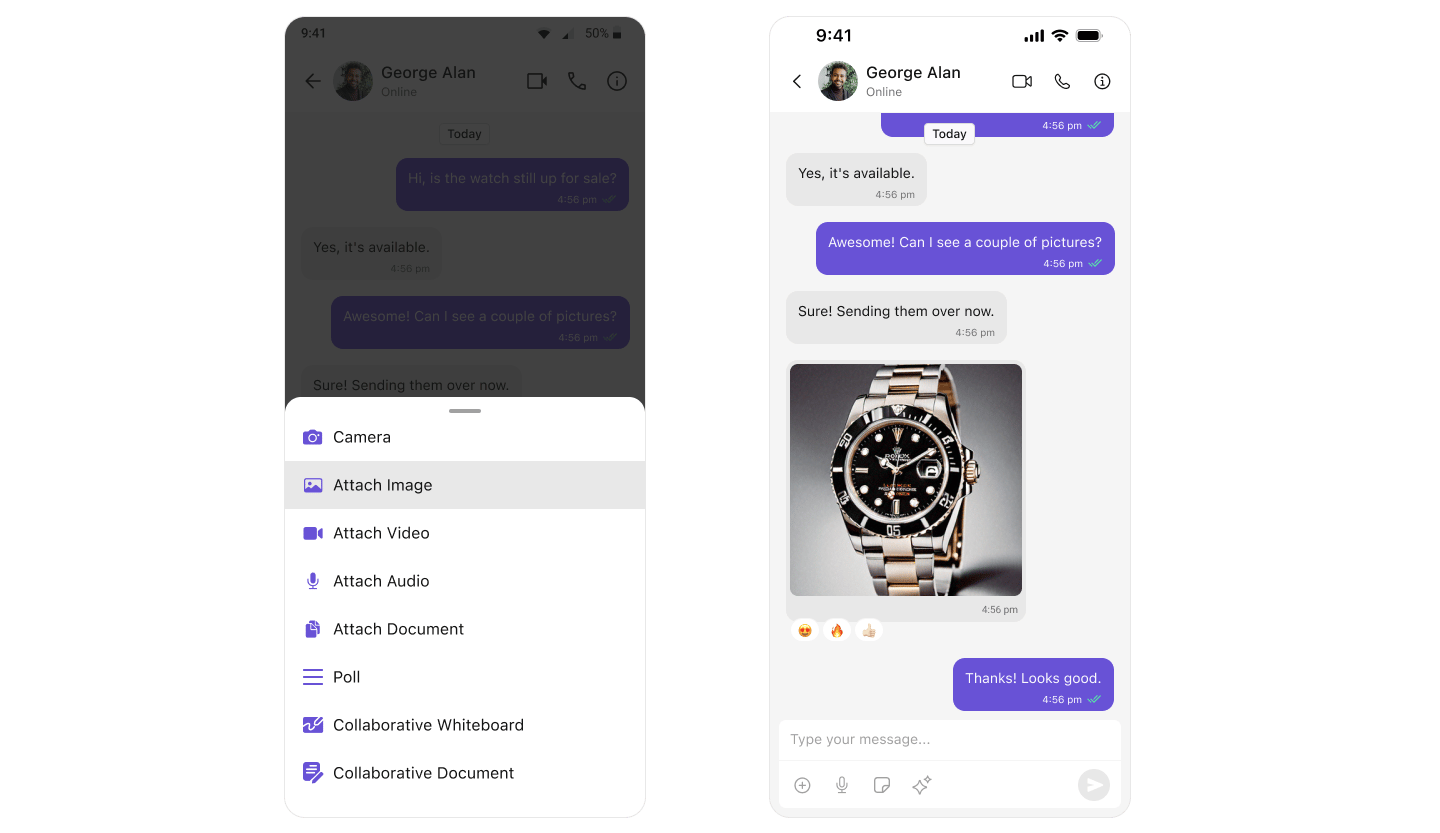
import UIKit
import CometChatUIKitSwift
import CometChatSDK

class ChatViewController: UIViewController {

    override func viewDidLoad() {
        super.viewDidLoad()

        // For one-on-one chat
        let messagesVC = CometChatMessages()

        // Set the user to chat with
        CometChat.getUser(UID: "cometchat-uid-1") { user in
            DispatchQueue.main.async {
                messagesVC.set(user: user)
                self.navigationController?.pushViewController(messagesVC, animated: true)
            }
        } onError: { error in
            print("Error: \(error?.errorDescription ?? "")")
        }
    }
}
- MessageComposer - Text input and send button
- MessageList - Displays sent and received messages
- Messages - Complete messaging screen (includes both)
Media Sharing
Share images, videos, audio files, and documents.import UIKit
import CometChatUIKitSwift
import CometChatSDK
class MediaChatViewController: UIViewController {
override func viewDidLoad() {
super.viewDidLoad()
let messagesVC = CometChatMessages()
// The message composer automatically includes media sharing options
// Users can tap the attachment button to share:
// - Photos from library
// - Camera capture
// - Documents
// - Audio files
CometChat.getUser(UID: "cometchat-uid-1") { user in
DispatchQueue.main.async {
messagesVC.set(user: user)
self.navigationController?.pushViewController(messagesVC, animated: true)
}
} onError: { error in
print("Error: \(error?.errorDescription ?? "")")
}
}
// Send media programmatically
func sendImage(to receiverUID: String, imageURL: URL) {
let mediaMessage = MediaMessage(
receiverUid: receiverUID,
fileurl: imageURL.absoluteString,
messageType: .image,
receiverType: .user
)
CometChat.sendMediaMessage(message: mediaMessage) { message in
print("Image sent successfully")
} onError: { error in
print("Error sending image: \(error?.errorDescription ?? "")")
}
}
}
| Type | Bubble Component |
|---|---|
| Images | Image Bubble |
| Videos | Video Bubble |
| Audio | Audio Bubble |
| Files | File Bubble |
Read Receipts
Show when messages are delivered and read.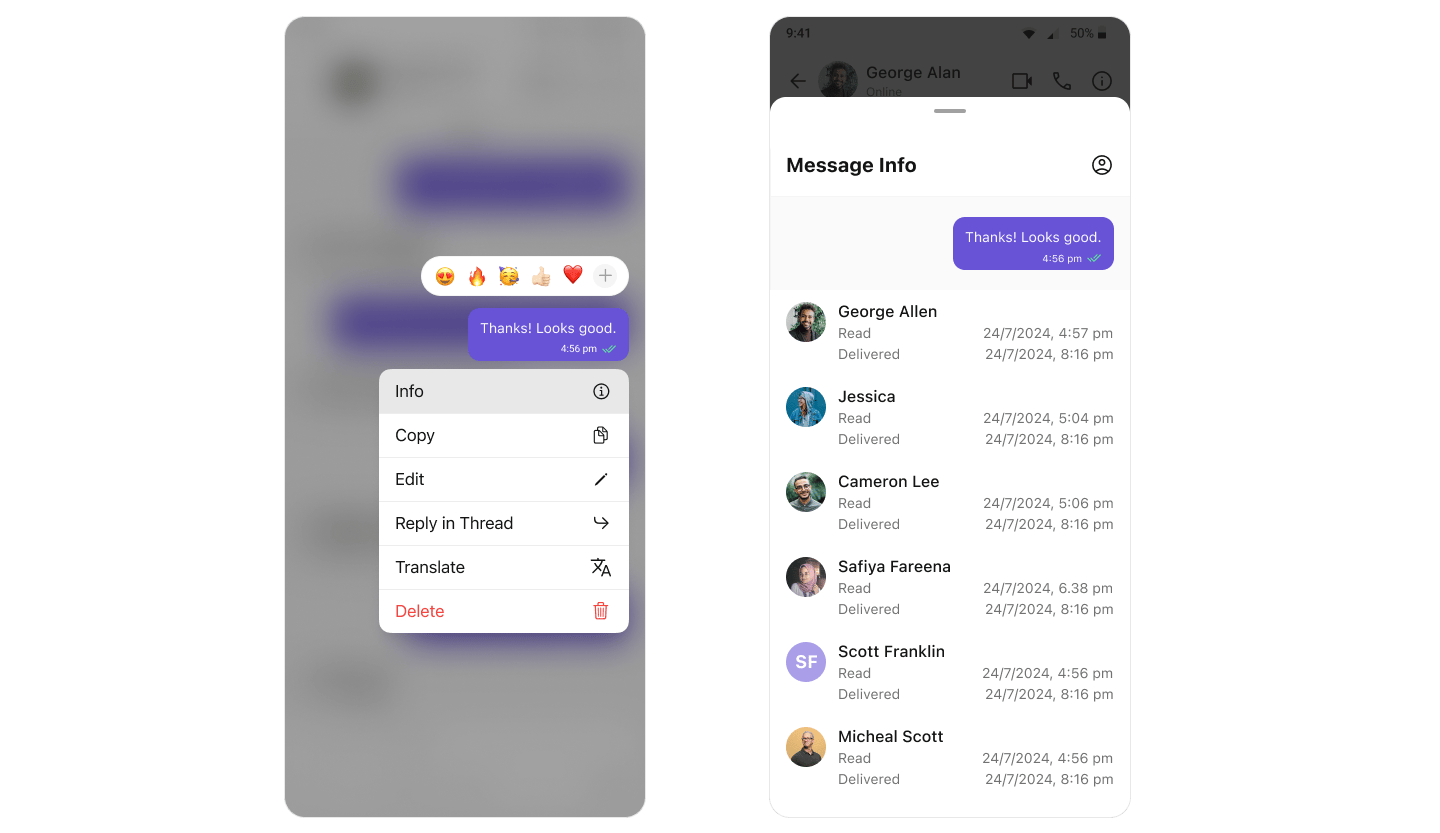
import UIKit
import CometChatUIKitSwift
import CometChatSDK

class ReceiptsViewController: UIViewController {

    override func viewDidLoad() {
        super.viewDidLoad()

        // Read receipts are enabled by default
        let messagesVC = CometChatMessages()

        // To hide receipts:
        // messagesVC.hideReceipts = true

        CometChat.getUser(UID: "cometchat-uid-1") { user in
            DispatchQueue.main.async {
                messagesVC.set(user: user)
                self.navigationController?.pushViewController(messagesVC, animated: true)
            }
        } onError: { error in
            print("Error: \(error?.errorDescription ?? "")")
        }
    }

    // View detailed message information
    func showMessageInfo(for message: BaseMessage) {
        let messageInfo = CometChatMessageInformation()
        messageInfo.set(message: message)
        navigationController?.pushViewController(messageInfo, animated: true)
    }
}
- ✓ Sent - Message sent to server
- ✓✓ Delivered - Message delivered to recipient’s device
- ✓✓ (blue) Read - Recipient has seen the message
- Conversations - Shows receipt status on last message
- MessageList - Shows receipts on each message
- MessageInformation - Detailed delivery/read info
Mark As Unread
Let users mark messages as unread to revisit later.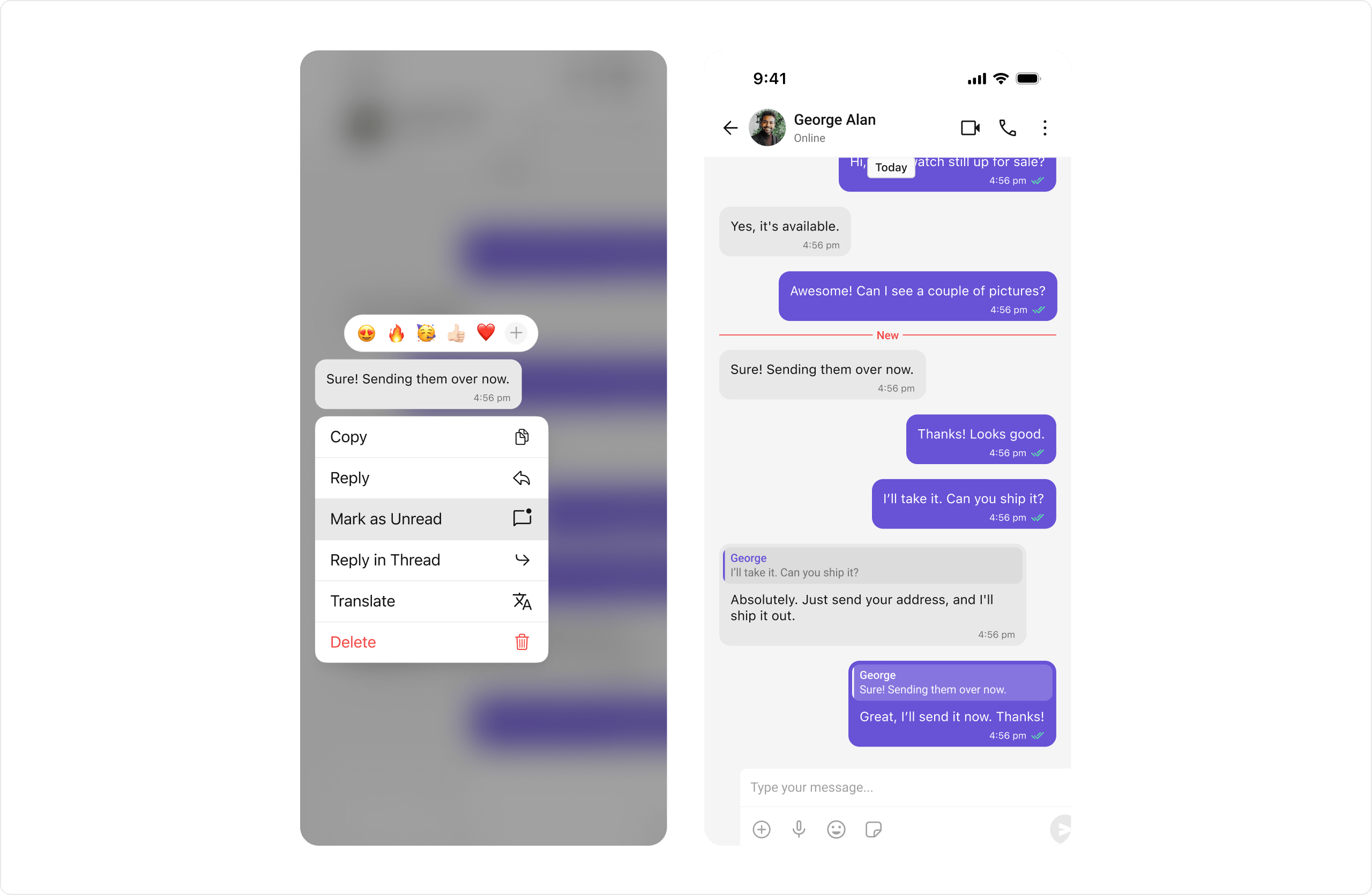
import UIKit
import CometChatUIKitSwift
import CometChatSDK

class UnreadMessagesViewController: UIViewController {

    override func viewDidLoad() {
        super.viewDidLoad()

        let messagesVC = CometChatMessages()

        // Enable starting from first unread message
        messagesVC.scrollToUnreadMessages = true

        CometChat.getUser(UID: "cometchat-uid-1") { user in
            DispatchQueue.main.async {
                messagesVC.set(user: user)
                self.navigationController?.pushViewController(messagesVC, animated: true)
            }
        } onError: { error in
            print("Error: \(error?.errorDescription ?? "")")
        }
    }

    // Mark a message as unread programmatically
    func markAsUnread(message: BaseMessage) {
        CometChat.markAsUnread(
            baseMessage: message
        ) { _ in
            print("Marked as unread")
        } onError: { error in
            print("Error: \(error?.errorDescription ?? "")")
        }
    }
}
Typing Indicators
Show when users are typing in real-time.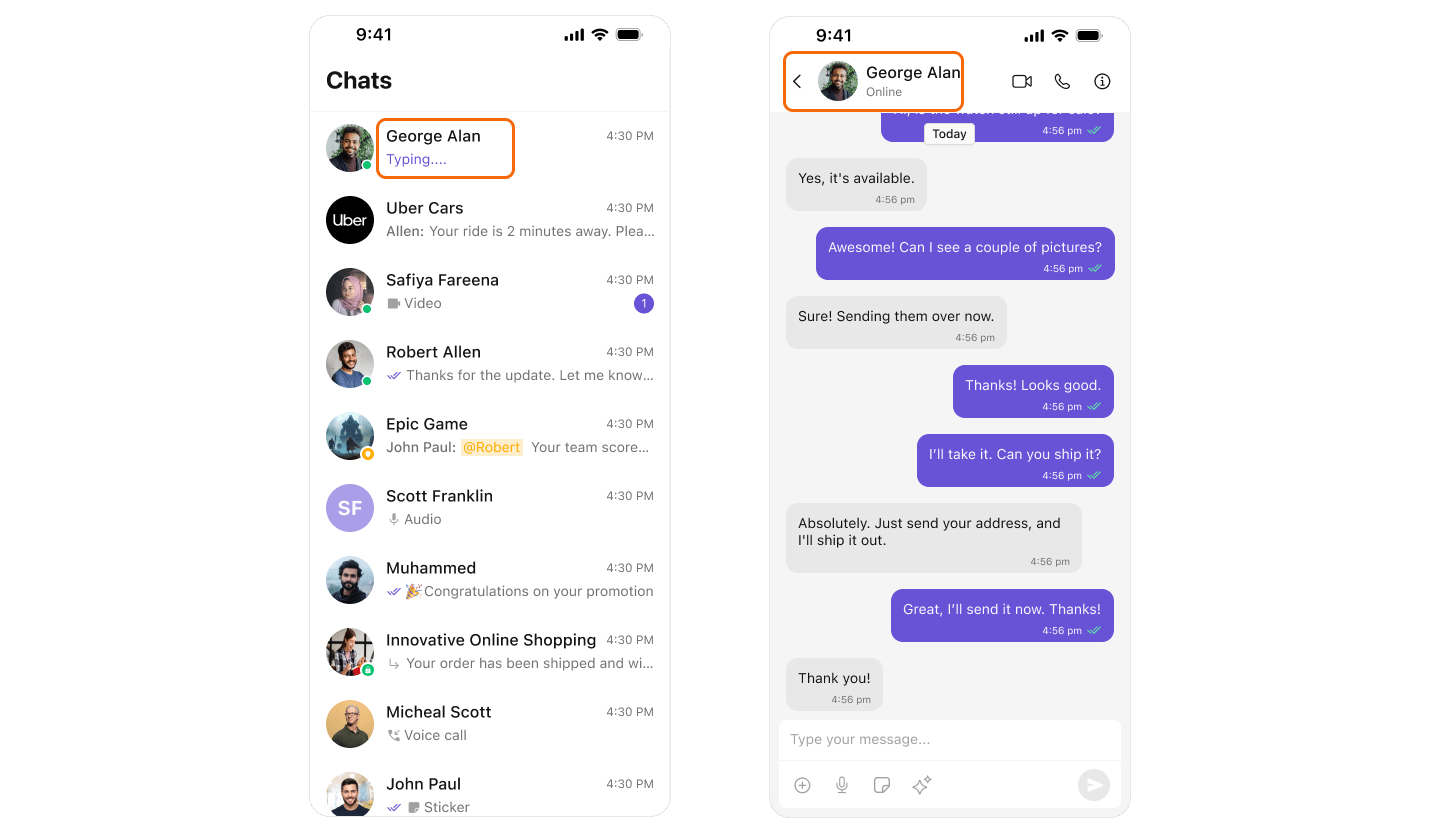
import UIKit
import CometChatUIKitSwift
import CometChatSDK

class TypingIndicatorViewController: UIViewController {

    override func viewDidLoad() {
        super.viewDidLoad()

        // Typing indicators are enabled by default in:
        // - CometChatConversations (shows "typing..." in conversation list)
        // - CometChatMessageHeader (shows "typing..." below user name)

        let messagesVC = CometChatMessages()

        CometChat.getUser(UID: "cometchat-uid-1") { user in
            DispatchQueue.main.async {
                messagesVC.set(user: user)
                self.navigationController?.pushViewController(messagesVC, animated: true)
            }
        } onError: { error in
            print("Error: \(error?.errorDescription ?? "")")
        }
    }

    // Send typing indicator manually
    func startTyping(to receiverUID: String) {
        let typingIndicator = TypingIndicator(
            receiverID: receiverUID,
            receiverType: .user
        )
        CometChat.startTyping(indicator: typingIndicator)
    }

    func stopTyping(to receiverUID: String) {
        let typingIndicator = TypingIndicator(
            receiverID: receiverUID,
            receiverType: .user
        )
        CometChat.endTyping(indicator: typingIndicator)
    }
}
- Conversations - Shows typing in conversation list
- MessageHeader - Shows typing below user/group name
User Presence
Display online/offline status for users.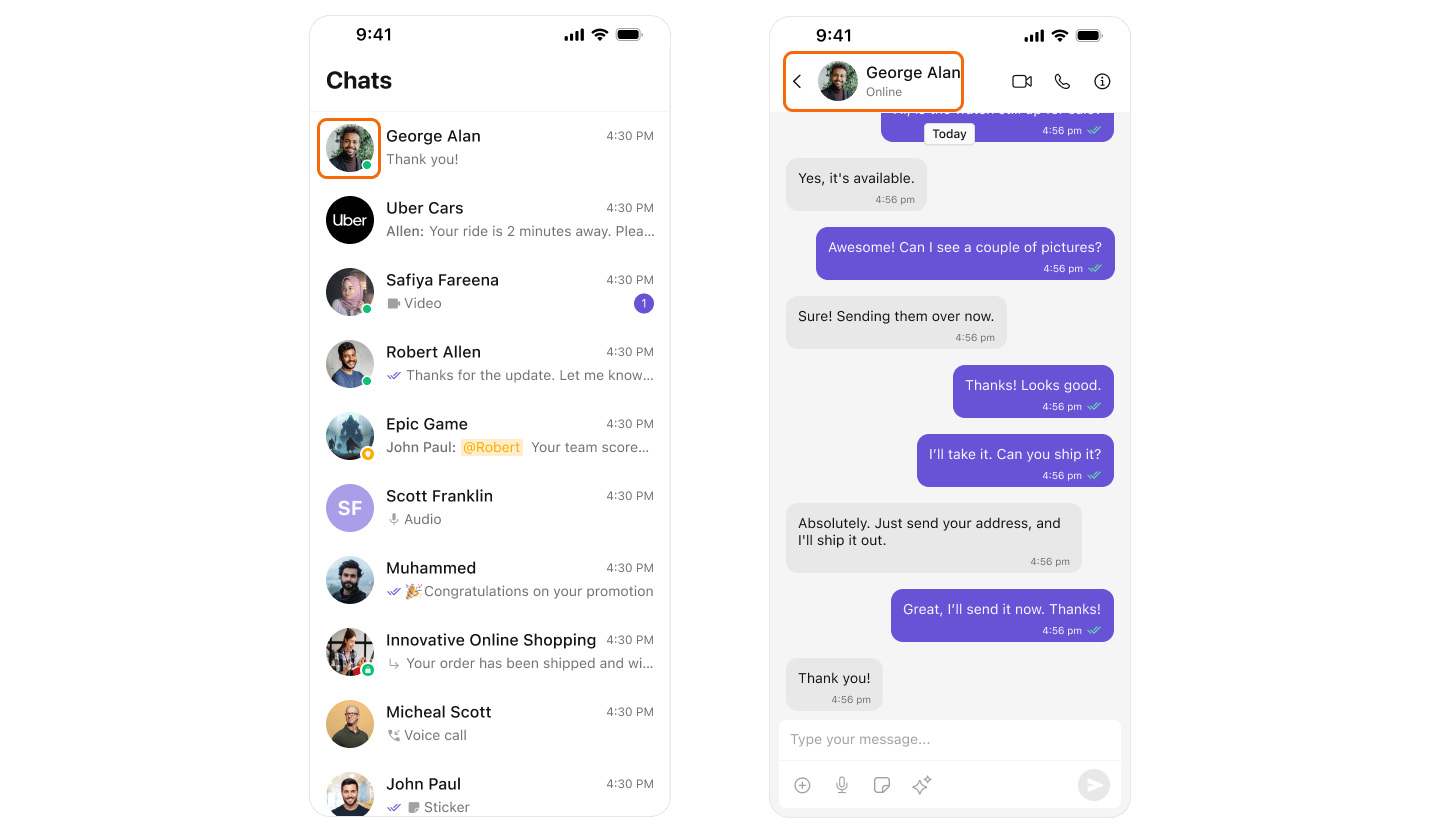
import UIKit
import CometChatUIKitSwift
import CometChatSDK

class PresenceViewController: UIViewController {

    override func viewDidLoad() {
        super.viewDidLoad()

        // User presence is shown automatically in:
        // - CometChatConversations (green dot for online users)
        // - CometChatMessageHeader (shows "Online" or "Last seen")
        // - CometChatUsers (green dot for online users)
        // - CometChatGroupMembers (green dot for online members)

        let conversations = CometChatConversations()

        // To hide user status:
        // conversations.hideUserStatus = true

        navigationController?.pushViewController(conversations, animated: true)
    }

    // Listen for presence changes
    func listenForPresenceChanges() {
        CometChat.addUserListener("presence-listener", self)
    }
}

extension PresenceViewController: CometChatUserDelegate {
    func onUserOnline(user: User) {
        print("\(user.name ?? "") is now online")
    }

    func onUserOffline(user: User) {
        print("\(user.name ?? "") went offline")
    }
}
Reactions
Let users react to messages with emojis.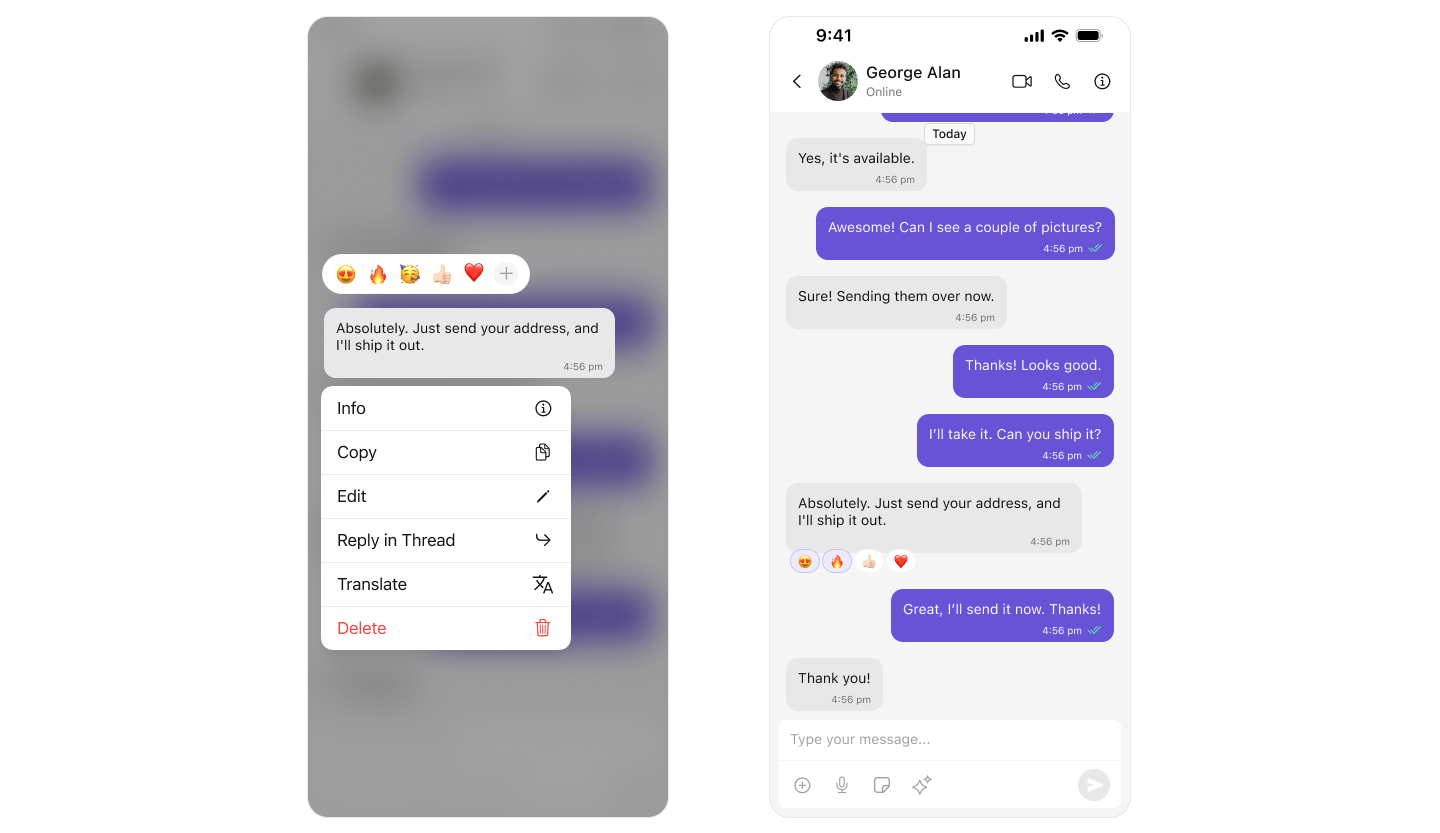
import UIKit
import CometChatUIKitSwift
import CometChatSDK

class ReactionsViewController: UIViewController {

    override func viewDidLoad() {
        super.viewDidLoad()

        // Reactions are enabled by default
        // Users can long-press a message to add reactions

        let messagesVC = CometChatMessages()

        CometChat.getUser(UID: "cometchat-uid-1") { user in
            DispatchQueue.main.async {
                messagesVC.set(user: user)
                self.navigationController?.pushViewController(messagesVC, animated: true)
            }
        } onError: { error in
            print("Error: \(error?.errorDescription ?? "")")
        }
    }

    // Add reaction programmatically
    func addReaction(to message: BaseMessage, emoji: String) {
        CometChat.addReaction(
            messageId: message.id,
            reaction: emoji
        ) { message in
            print("Reaction added")
        } onError: { error in
            print("Error: \(error?.errorDescription ?? "")")
        }
    }

    // Remove reaction
    func removeReaction(from message: BaseMessage, emoji: String) {
        CometChat.removeReaction(
            messageId: message.id,
            reaction: emoji
        ) { message in
            print("Reaction removed")
        } onError: { error in
            print("Error: \(error?.errorDescription ?? "")")
        }
    }
}
Mentions
Tag users in messages with @mentions.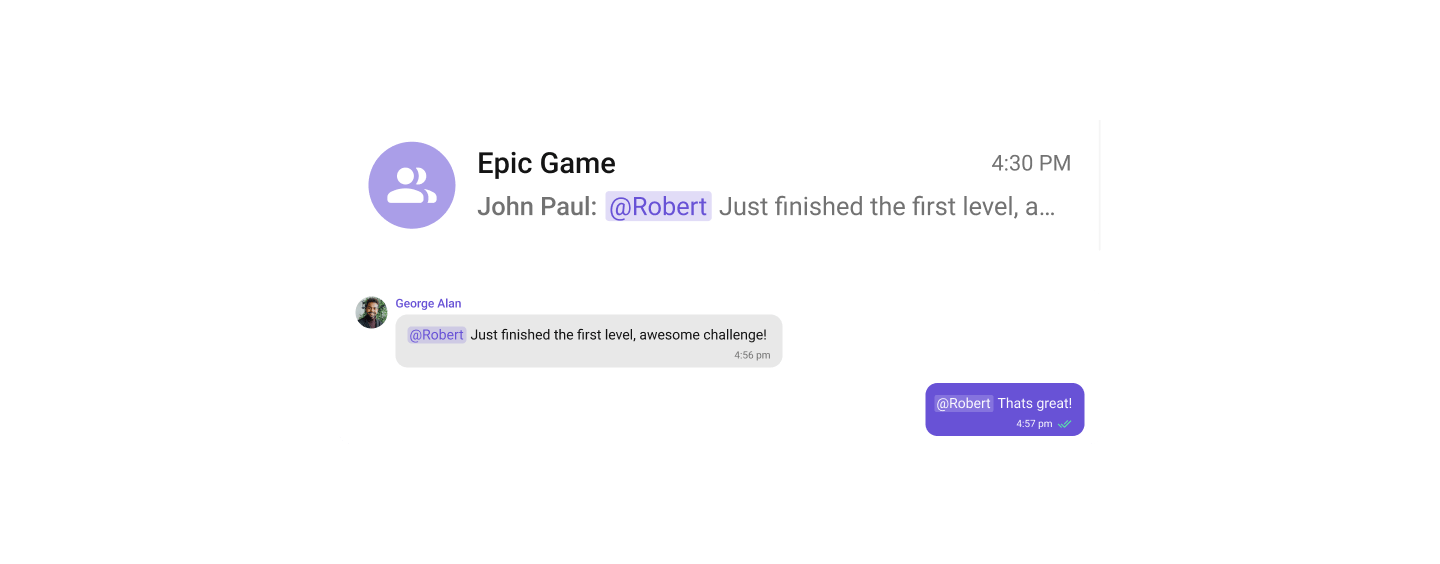
import UIKit
import CometChatUIKitSwift
import CometChatSDK

class MentionsViewController: UIViewController {

    override func viewDidLoad() {
        super.viewDidLoad()

        // Mentions are enabled by default
        // Type @ in the composer to see mention suggestions

        let messagesVC = CometChatMessages()

        CometChat.getGroup(GUID: "group-123") { group in
            DispatchQueue.main.async {
                messagesVC.set(group: group)
                self.navigationController?.pushViewController(messagesVC, animated: true)
            }
        } onError: { error in
            print("Error: \(error?.errorDescription ?? "")")
        }
    }

    // Send message with mention programmatically
    func sendMessageWithMention(to groupID: String, mentionedUser: User) {
        let textMessage = TextMessage(
            receiverUid: groupID,
            text: "Hey @\(mentionedUser.name ?? ""), check this out!",
            receiverType: .group
        )

        // Add mentioned users
        textMessage.mentionedUsers = [mentionedUser]

        CometChat.sendTextMessage(message: textMessage) { message in
            print("Message with mention sent")
        } onError: { error in
            print("Error: \(error?.errorDescription ?? "")")
        }
    }
}
Rich Text Formatting
Rich Text Formatting allows users to style their messages with bold, italic, strikethrough, code, code blocks, blockquotes, ordered/unordered lists, and links. This brings richer expression to conversations and helps users emphasize key points.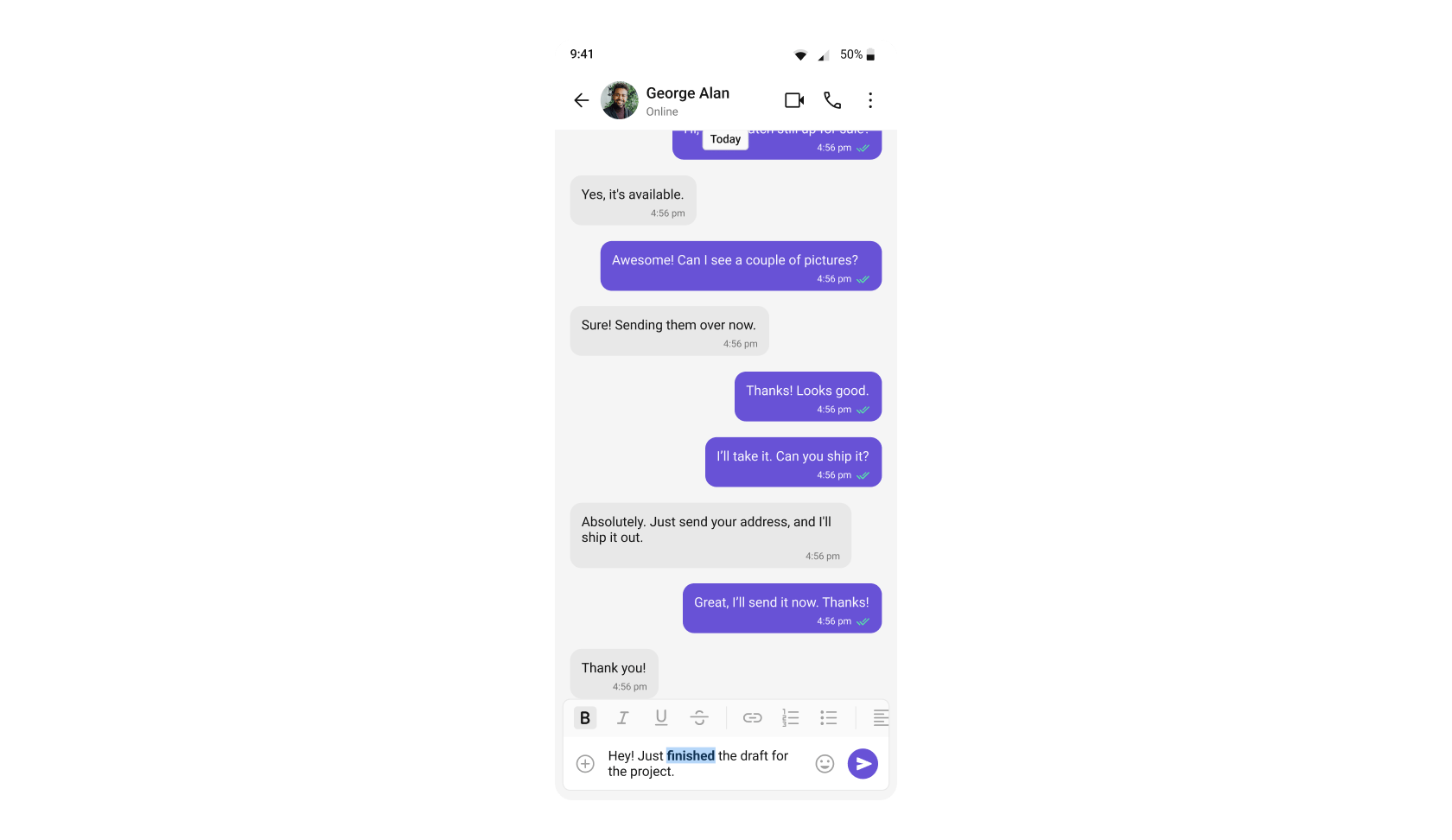
enableRichTextFormatting and showRichTextFormattingOptions are true by default. See the CompactMessageComposer Rich Text Formatting section for full configuration details.
Rich text formatting in message bubbles (rendering formatted text in the MessageList) is supported from UI Kit version 5.2.11 onwards. Earlier versions will display the raw markdown syntax instead of formatted text.
| Component | Functionality |
|---|---|
| CompactMessageComposer | Provides a built-in rich text editor with formatting toolbar and text selection menu items for bold, italic, strikethrough, code, links, lists, blockquotes, and code blocks. |
| MessageList | Renders formatted messages with the appropriate styling applied, displaying rich text formatting as intended by the sender. |
Threaded Conversations
Reply to specific messages in threads.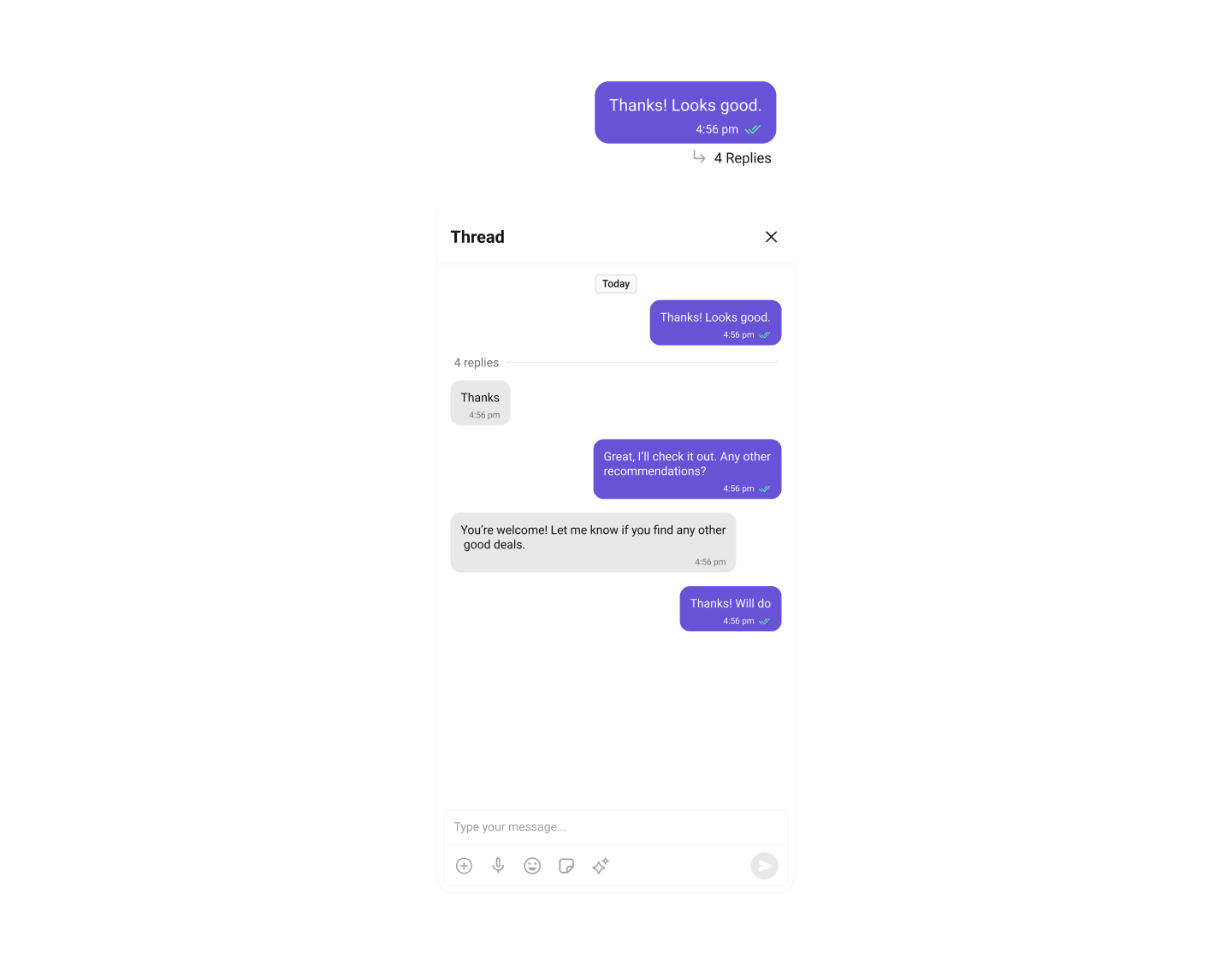
import UIKit
import CometChatUIKitSwift
import CometChatSDK

class ThreadedMessagesViewController: UIViewController {

    override func viewDidLoad() {
        super.viewDidLoad()

        // Threaded messages are enabled by default
        // Users can tap "Reply in thread" on any message

        let messagesVC = CometChatMessages()

        CometChat.getUser(UID: "cometchat-uid-1") { user in
            DispatchQueue.main.async {
                messagesVC.set(user: user)
                self.navigationController?.pushViewController(messagesVC, animated: true)
            }
        } onError: { error in
            print("Error: \(error?.errorDescription ?? "")")
        }
    }

    // Open thread view for a message
    // Note: Thread replies are handled automatically by CometChatMessageList
    // when user taps "Reply in thread". The thread view uses CometChatThreadedMessageHeader
    // combined with CometChatMessageList and CometChatMessageComposer.
    func openThread(for parentMessage: BaseMessage, user: User) {
        // Create a view controller to host the threaded messages
        let threadVC = UIViewController()
        threadVC.view.backgroundColor = .systemBackground

        // Create threaded message header
        let threadedHeader = CometChatThreadedMessageHeader()
        threadedHeader.set(parentMessage: parentMessage)
        threadedHeader.set(controller: threadVC)
        threadedHeader.translatesAutoresizingMaskIntoConstraints = false

        // Create message list for thread replies
        let messageList = CometChatMessageList()
        messageList.set(user: user)
        messageList.set(parentMessage: parentMessage)
        messageList.set(controller: threadVC)
        messageList.translatesAutoresizingMaskIntoConstraints = false

        // Create composer for thread replies
        let composer = CometChatMessageComposer()
        composer.set(user: user)
        composer.set(parentMessage: parentMessage)
        composer.set(controller: threadVC)
        composer.translatesAutoresizingMaskIntoConstraints = false

        // Add to view
        threadVC.view.addSubview(threadedHeader)
        threadVC.view.addSubview(messageList)
        threadVC.view.addSubview(composer)

        // Layout constraints
        NSLayoutConstraint.activate([
            threadedHeader.topAnchor.constraint(equalTo: threadVC.view.safeAreaLayoutGuide.topAnchor),
            threadedHeader.leadingAnchor.constraint(equalTo: threadVC.view.leadingAnchor),
            threadedHeader.trailingAnchor.constraint(equalTo: threadVC.view.trailingAnchor),

            messageList.topAnchor.constraint(equalTo: threadedHeader.bottomAnchor),
            messageList.leadingAnchor.constraint(equalTo: threadVC.view.leadingAnchor),
            messageList.trailingAnchor.constraint(equalTo: threadVC.view.trailingAnchor),
            messageList.bottomAnchor.constraint(equalTo: composer.topAnchor),

            composer.leadingAnchor.constraint(equalTo: threadVC.view.leadingAnchor),
            composer.trailingAnchor.constraint(equalTo: threadVC.view.trailingAnchor),
            composer.bottomAnchor.constraint(equalTo: threadVC.view.safeAreaLayoutGuide.bottomAnchor)
        ])

        navigationController?.pushViewController(threadVC, animated: true)
    }

    // Send reply in thread programmatically
    func sendThreadReply(parentMessage: BaseMessage, text: String) {
        let reply = TextMessage(
            receiverUid: parentMessage.receiverUid,
            text: text,
            receiverType: parentMessage.receiverType
        )
        reply.parentMessageId = parentMessage.id

        CometChat.sendTextMessage(message: reply) { message in
            print("Thread reply sent")
        } onError: { error in
            print("Error: \(error?.errorDescription ?? "")")
        }
    }
}
- ThreadedMessages - Displays thread replies
Group Chat
Create and manage group conversations.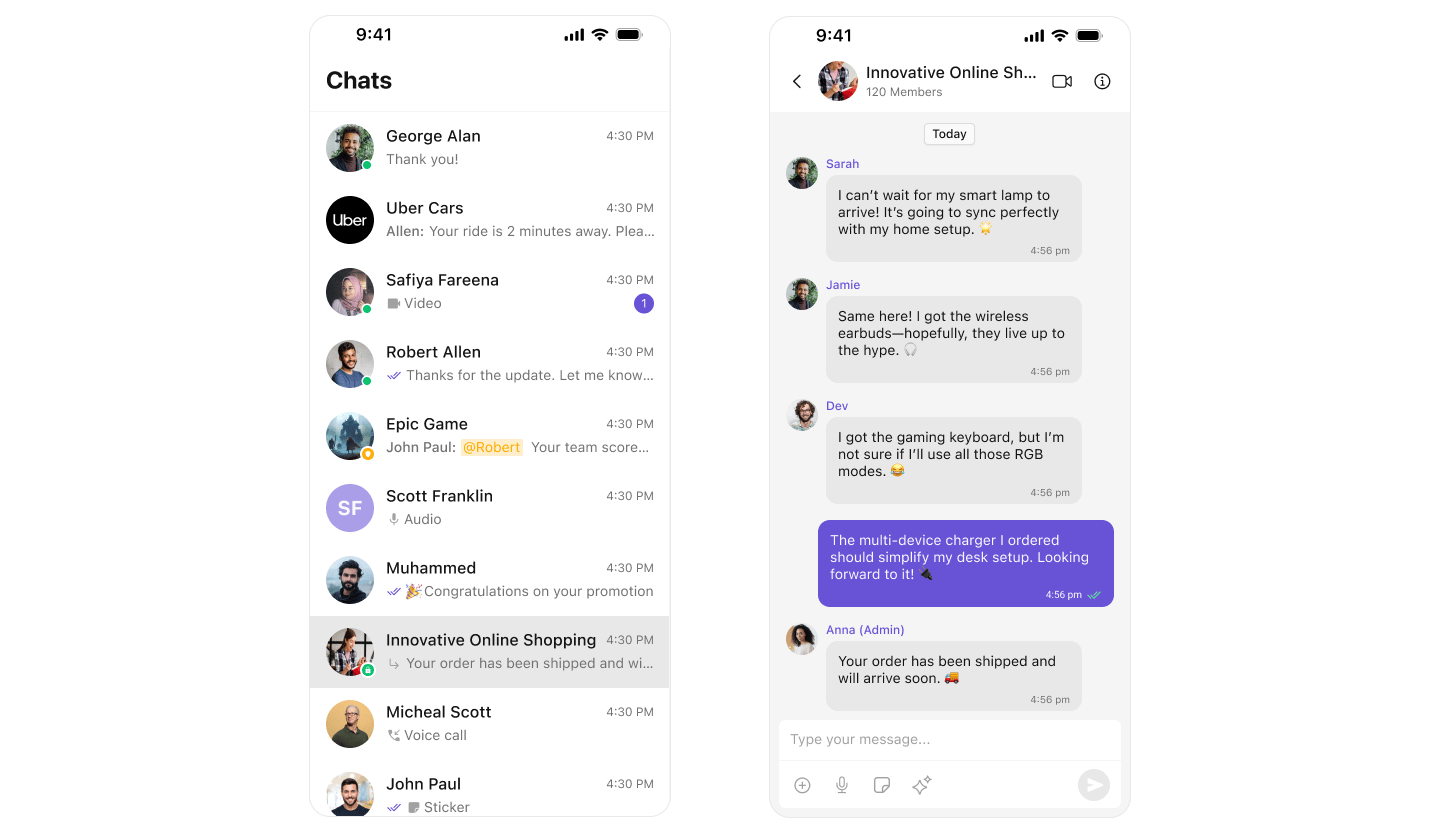
import UIKit
import CometChatUIKitSwift
import CometChatSDK

class GroupChatViewController: UIViewController {

    override func viewDidLoad() {
        super.viewDidLoad()
        showGroupsList()
    }

    // Show all groups
    func showGroupsList() {
        let groups = CometChatGroups()

        groups.set(onItemClick: { [weak self] group, _ in
            self?.openGroupChat(group: group)
        })

        navigationController?.pushViewController(groups, animated: true)
    }

    // Open chat for a group
    func openGroupChat(group: Group) {
        let messagesVC = CometChatMessages()
        messagesVC.set(group: group)
        navigationController?.pushViewController(messagesVC, animated: true)
    }

    // Create a new group
    func createGroup(name: String, type: CometChat.groupType) {
        let group = Group(
            guid: UUID().uuidString,
            name: name,
            groupType: type,
            password: nil
        )

        CometChat.createGroup(group: group) { createdGroup in
            print("Group created: \(createdGroup.name ?? "")")
            DispatchQueue.main.async {
                self.openGroupChat(group: createdGroup)
            }
        } onError: { error in
            print("Error: \(error?.errorDescription ?? "")")
        }
    }

    // Join a public group
    func joinGroup(guid: String) {
        CometChat.joinGroup(
            GUID: guid,
            groupType: .public,
            password: nil
        ) { group in
            print("Joined group: \(group.name ?? "")")
            DispatchQueue.main.async {
                self.openGroupChat(group: group)
            }
        } onError: { error in
            print("Error: \(error?.errorDescription ?? "")")
        }
    }
}
Quoted Reply
Reply to specific messages with context.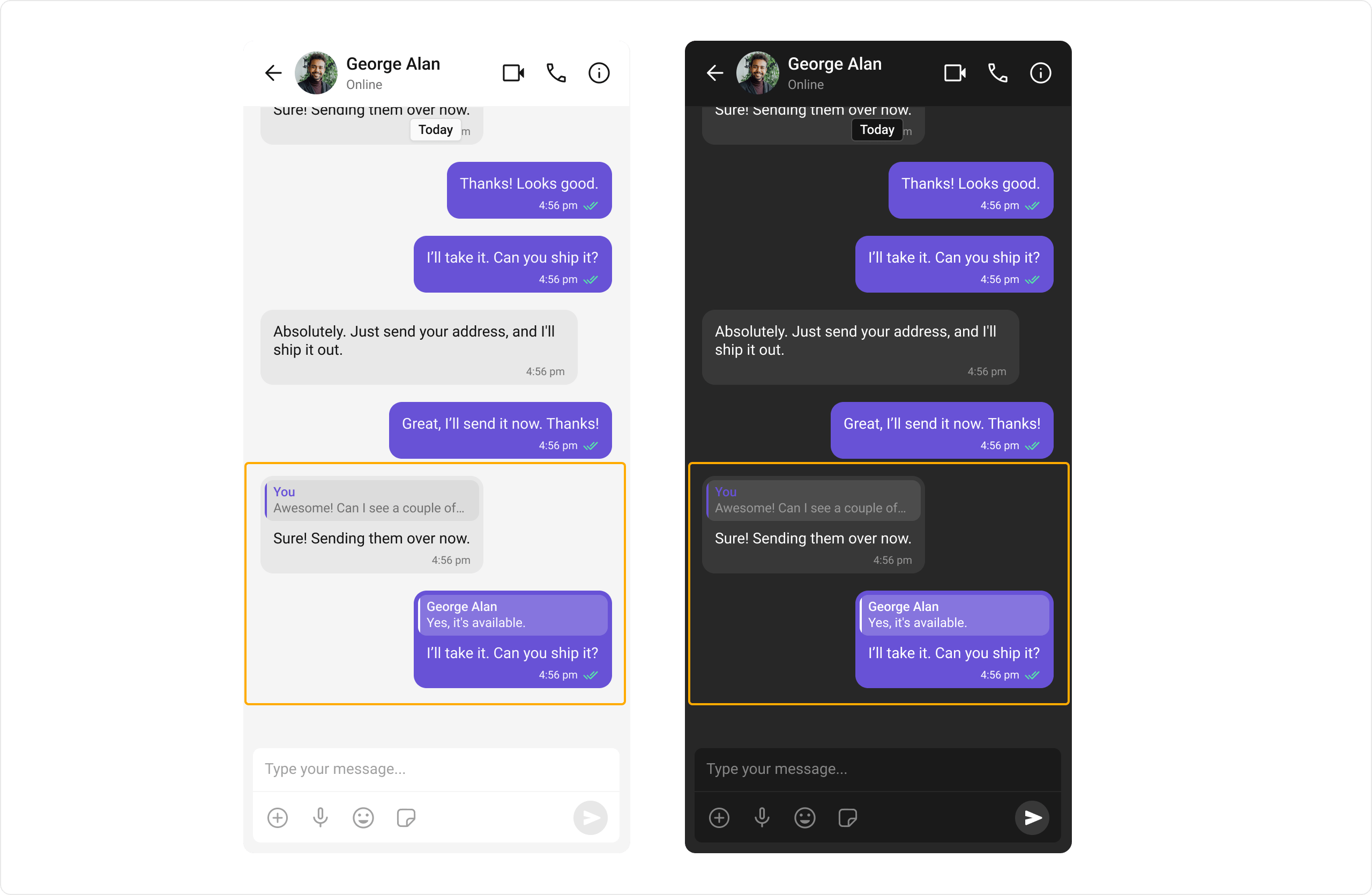
import UIKit
import CometChatUIKitSwift
import CometChatSDK

class QuotedReplyViewController: UIViewController {

    override func viewDidLoad() {
        super.viewDidLoad()

        // Quoted reply is enabled by default
        // Users can swipe right on a message or tap "Reply" in message actions

        let messagesVC = CometChatMessages()

        CometChat.getUser(UID: "cometchat-uid-1") { user in
            DispatchQueue.main.async {
                messagesVC.set(user: user)
                self.navigationController?.pushViewController(messagesVC, animated: true)
            }
        } onError: { error in
            print("Error: \(error?.errorDescription ?? "")")
        }
    }
}
Search
Search across conversations and messages.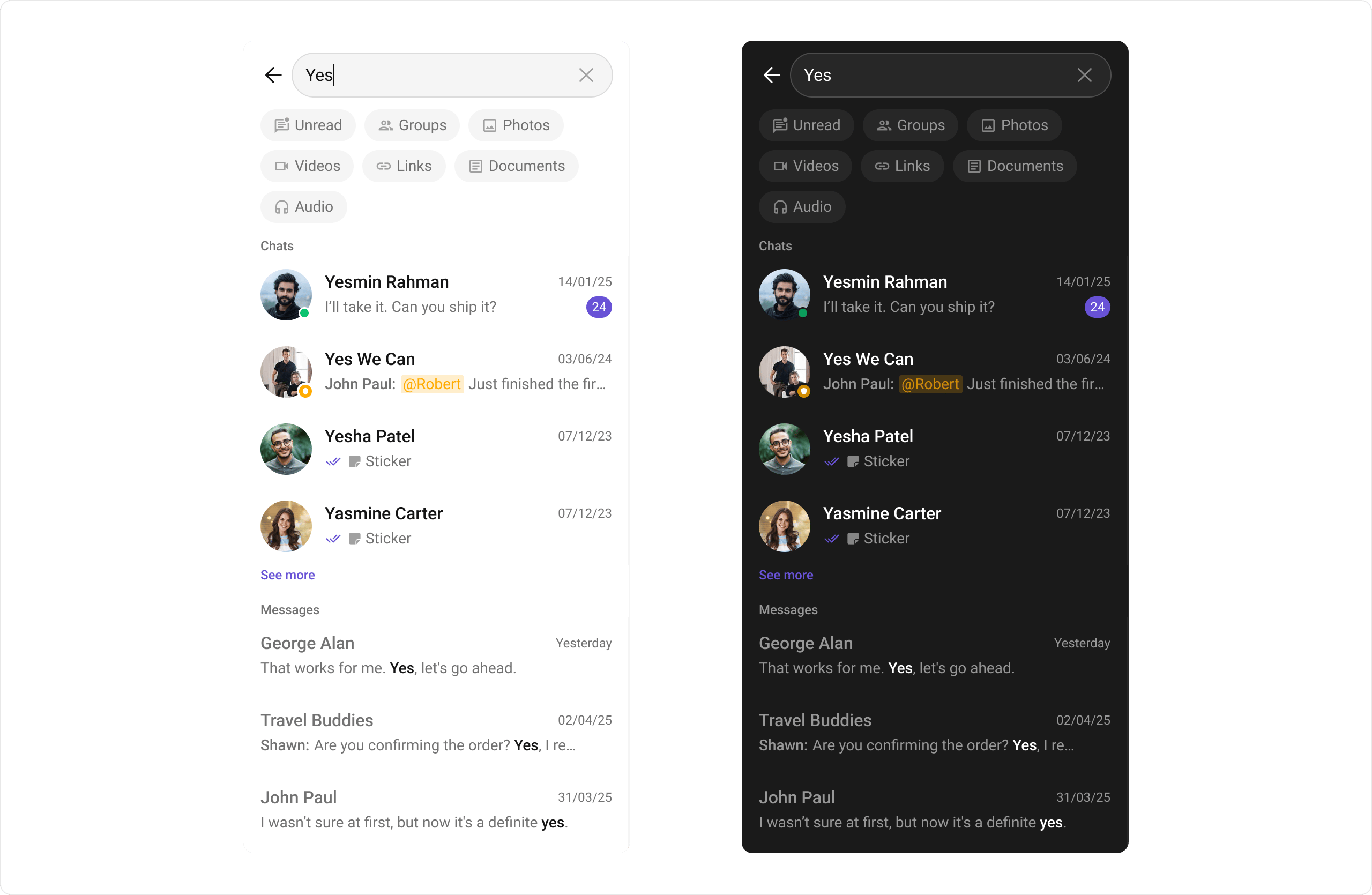
import UIKit
import CometChatUIKitSwift
import CometChatSDK

class SearchViewController: UIViewController {

    override func viewDidLoad() {
        super.viewDidLoad()

        // Search is available in:
        // - CometChatConversations (search bar at top)
        // - CometChatMessageHeader (search button)

        let conversations = CometChatConversations()

        // Search is enabled by default
        // To hide search:
        // conversations.hideSearch = true

        navigationController?.pushViewController(conversations, animated: true)
    }

    // Open dedicated search screen
    func openSearch() {
        let search = CometChatSearch()
        navigationController?.pushViewController(search, animated: true)
    }
}
- Search - Dedicated search screen
- MessageHeader - Search within conversation
- Conversations - Search conversations
Moderation
Automatically filter inappropriate content.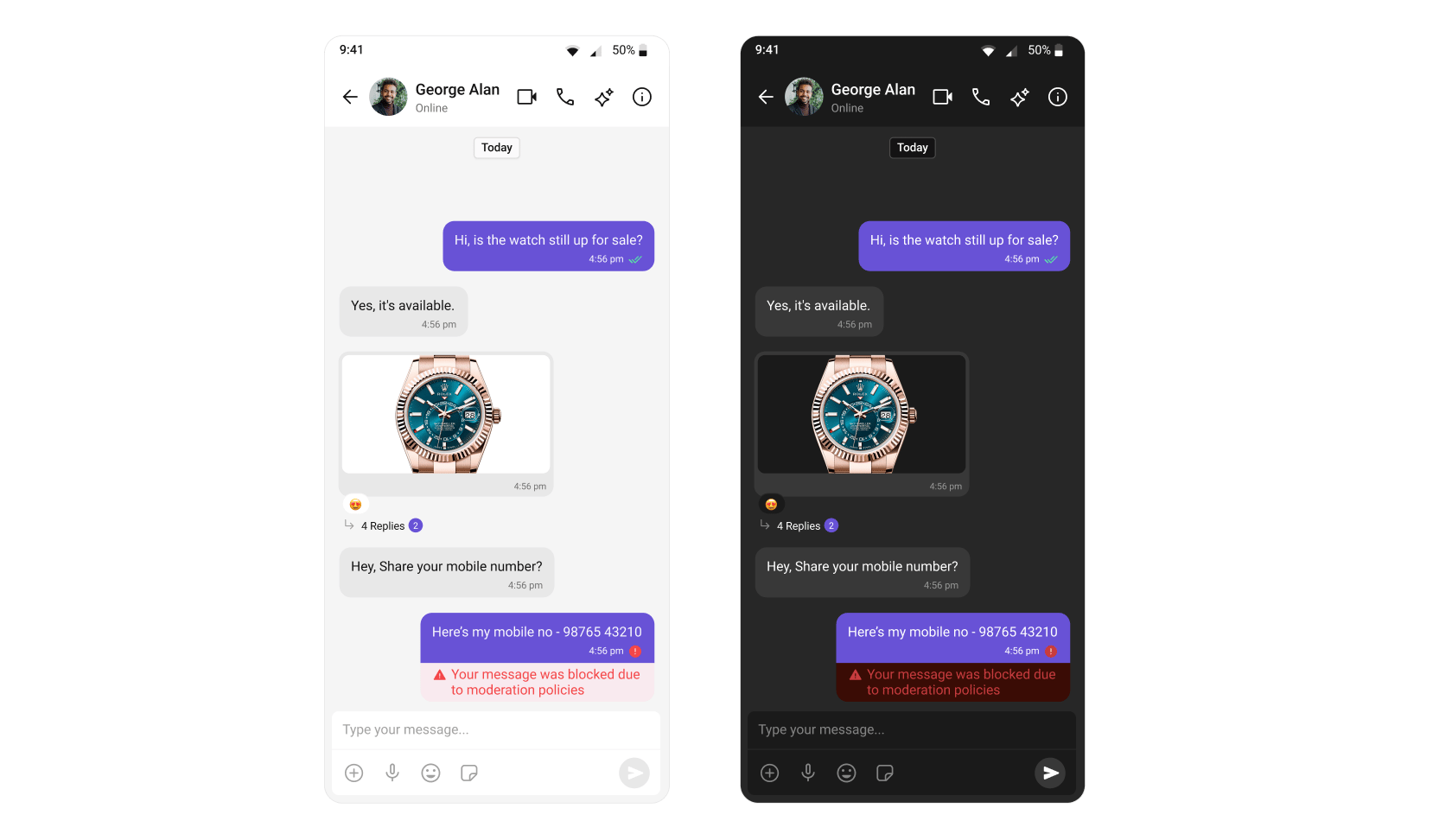
import UIKit
import CometChatUIKitSwift
import CometChatSDK

class ModerationViewController: UIViewController {

    override func viewDidLoad() {
        super.viewDidLoad()

        // Moderation is handled automatically based on your
        // CometChat dashboard settings

        // Blocked messages are displayed appropriately
        // based on your moderation rules

        let messagesVC = CometChatMessages()

        CometChat.getUser(UID: "cometchat-uid-1") { user in
            DispatchQueue.main.async {
                messagesVC.set(user: user)
                self.navigationController?.pushViewController(messagesVC, animated: true)
            }
        } onError: { error in
            print("Error: \(error?.errorDescription ?? "")")
        }
    }
}
Configure moderation rules in your CometChat Dashboard.
Report Message
Allow users to report inappropriate messages.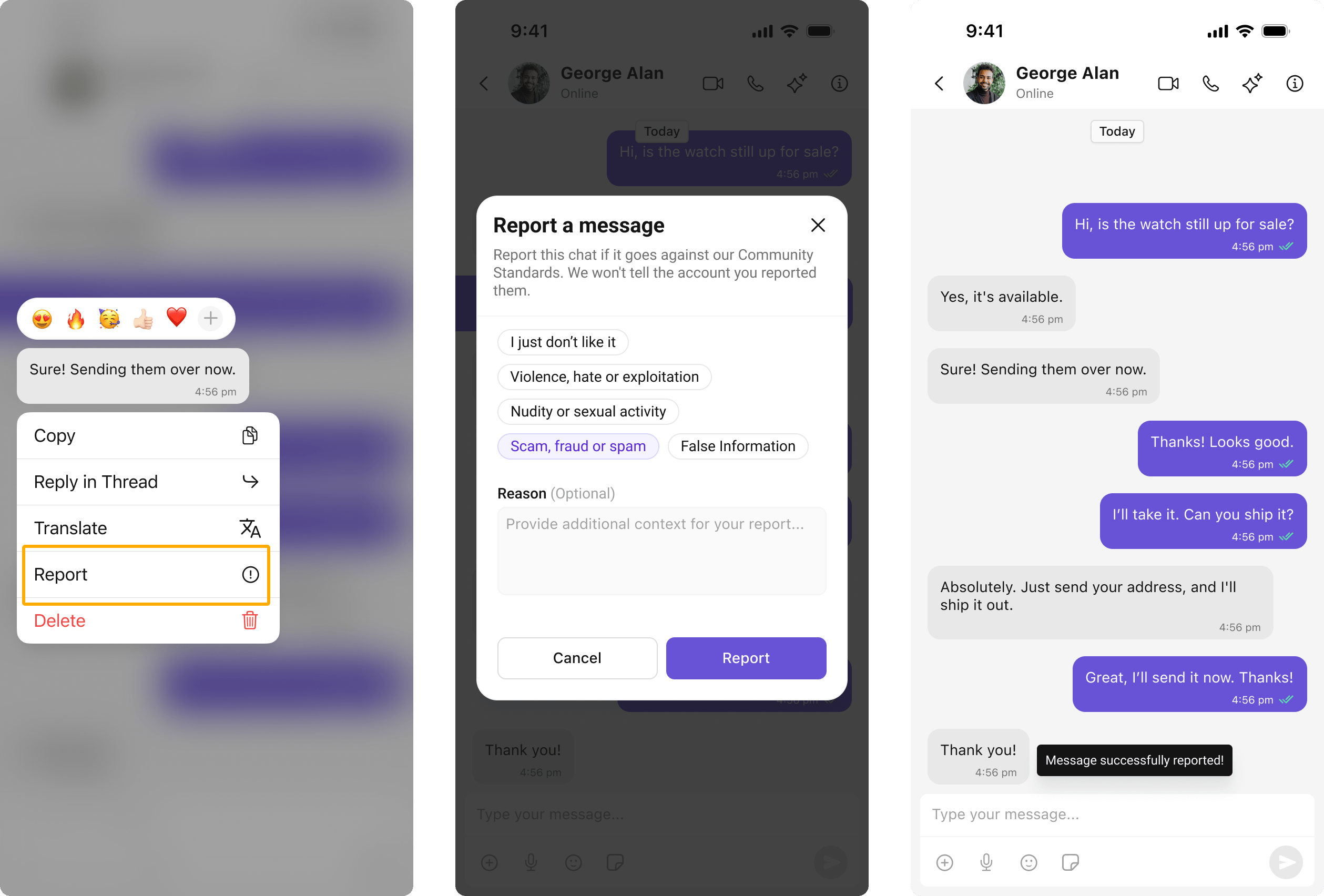
import UIKit
import CometChatUIKitSwift
import CometChatSDK

class ReportMessageViewController: UIViewController {

    override func viewDidLoad() {
        super.viewDidLoad()

        // Report message is available in message actions
        // Users can long-press a message and select "Report"

        let messagesVC = CometChatMessages()

        CometChat.getUser(UID: "cometchat-uid-1") { user in
            DispatchQueue.main.async {
                messagesVC.set(user: user)
                self.navigationController?.pushViewController(messagesVC, animated: true)
            }
        } onError: { error in
            print("Error: \(error?.errorDescription ?? "")")
        }
    }
}
View and manage reported messages in Flagged Messages.